How to Build an AI Agent: A Step-by-Step Guide for 2026

On this page
To build an AI agent, pick one repetitive workflow, give a capable model (such as Claude) clear instructions for it, connect the tools it needs to act (through MCP connectors or APIs), then test it on real inputs and decide how it gets triggered. You can do this with no code in Claude, with a visual builder like n8n or Make, or in code with an agent SDK. This guide walks through each step, with an example prompt you can copy.
We build AI agents for small and medium businesses every week: agents that process invoices, triage support tickets, research leads, and write and publish content. The steps below are the same ones we follow, including the parts that usually go wrong when people build their first agent on their own.
TL;DR
- An AI agent has four parts: a trigger, a model with instructions, tools it can use, and an output
- Start with one high-volume, rule-driven task (invoices, CRM updates, lead research, social posts), not a whole department
- Three ways to build: no-code in Claude (Projects + connectors), a workflow builder (n8n, Make, Zapier), or code (an agent SDK)
- The instructions matter most: role, goal, numbered steps, rules, output format and when to stop
- Test on real, messy inputs, start with read-only access, and keep a human approval step for anything hard to undo
- DIY agents in chat apps hit usage limits on long runs; always-on agents need hosting, retries and monitoring
What Do You Need to Build an AI Agent?
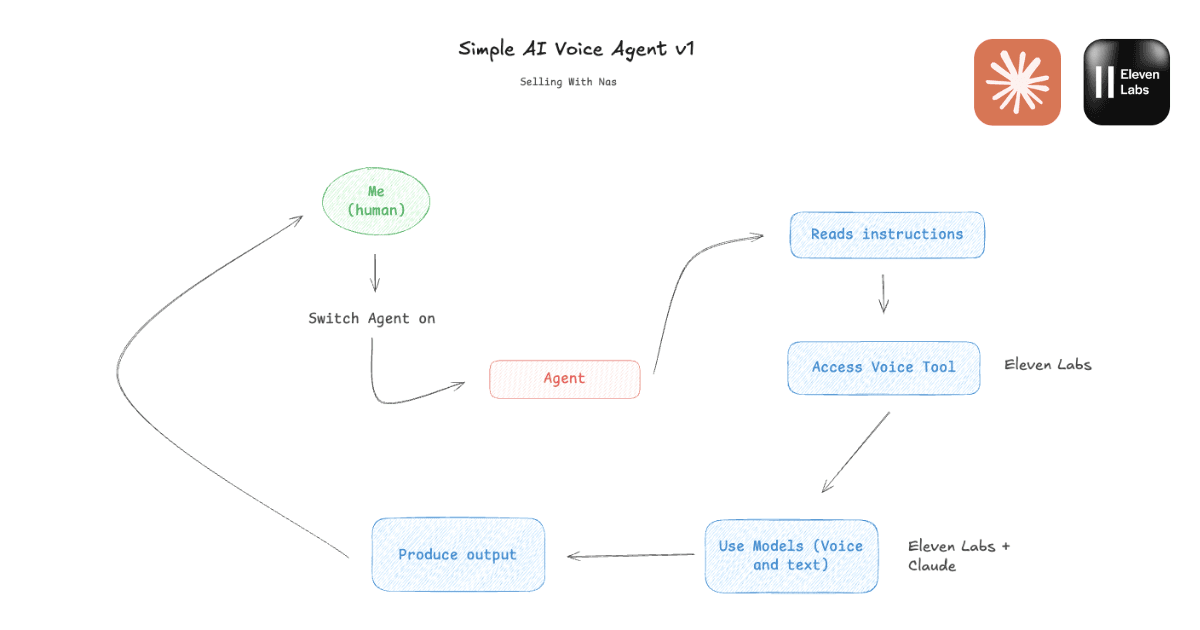
Every AI agent, from a weekend experiment to a production system, is made of the same four parts. If you understand these, every tool and framework becomes a different way of supplying them. (New to the idea? Start with our plain-English guide to what AI agents are.)
| Part | What it does | Examples |
|---|---|---|
| Trigger | Starts a run | You send a message, a schedule (every Monday 8am), a new form entry, a new email, a webhook |
| Model | Reasons about the task and decides each next step | Claude, GPT, Gemini |
| Instructions | Define the goal, steps, rules and output format | A system prompt, or Project instructions in Claude |
| Tools | Let the agent read and act in your apps | MCP connectors or APIs for Gmail, Google Sheets, HubSpot, QuickBooks, Notion, web search |
Step 1: Pick a Workflow Worth Automating
The most common mistake is starting too big ("automate our marketing"). Agents succeed on tasks that are repetitive, high-volume and well-defined: you could write the steps down once and hand them to a new hire. They struggle with strategy, high-stakes judgment and relationship-critical conversations.
Good first agents, with the manual time they typically replace:
| Workflow | Done by hand | What the agent does |
|---|---|---|
| Invoice processing | 20–40 min per invoice | Reads the invoice, extracts line items, posts them to QuickBooks or Xero |
| Social media content | 2–3 hours a week | Turns one idea into platform-specific posts, then drafts and schedules them |
| Lead research | 10–15 min per lead | Finds, enriches and researches hundreds of leads overnight |
| CRM and data entry | 5–10 min per contact | Logs calls and emails and updates records as they happen |
| Customer support replies | All day, every day | Answers common questions, ranks the rest by urgency, drafts a solution |
| Follow-ups and review requests | Inconsistent or forgotten | Sends timed, personalised follow-ups and review requests at the right moment |
Pick the one that costs you the most hours and has the clearest definition of "done". You can add more agents later; one that works reliably is worth more than five that half-work.
Step 2: Choose How You Will Build It
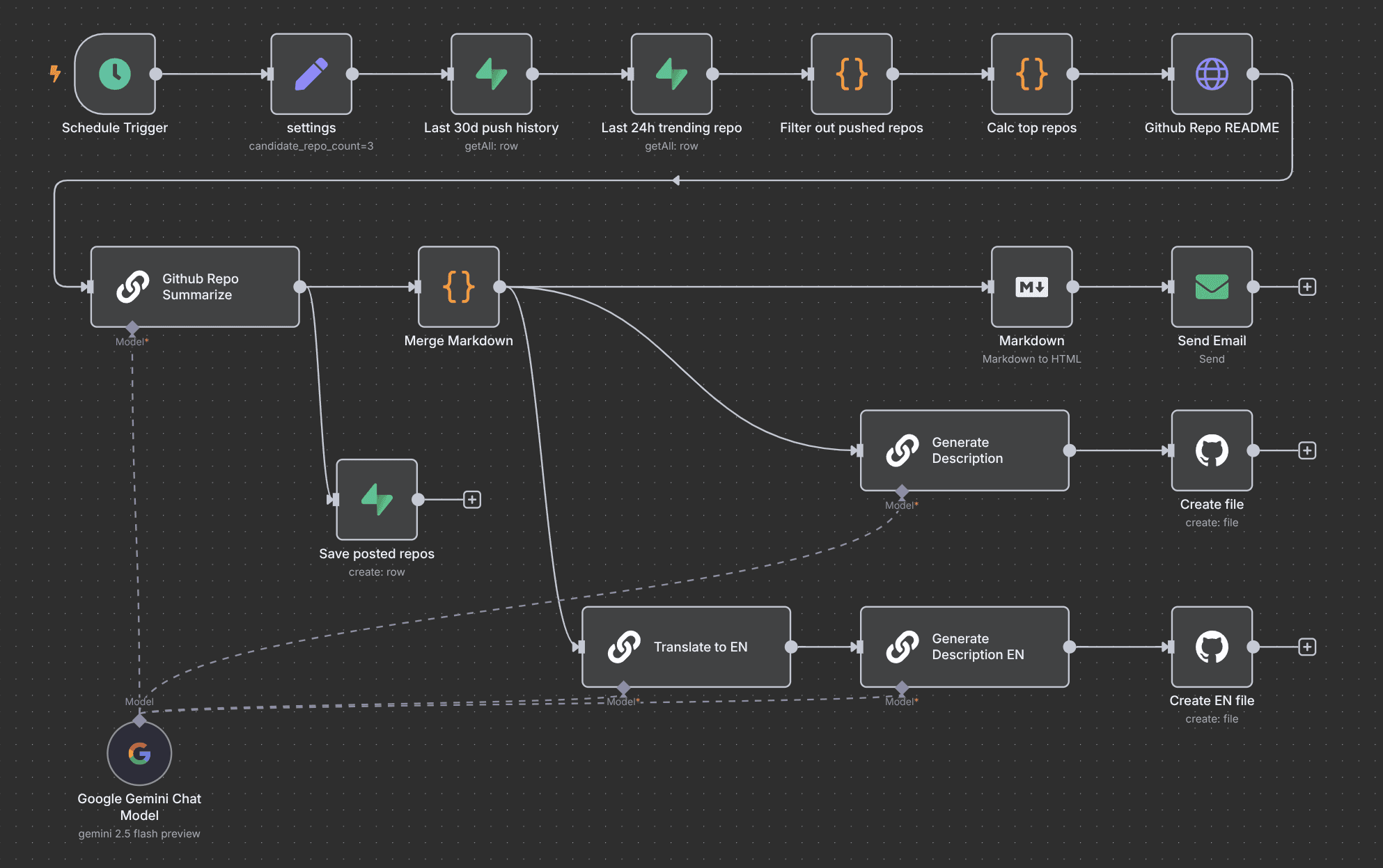
There are three practical routes. They supply the same four parts in different ways, and differ mostly in how much control you get and how reliably the agent can run without you.
| No-code chat agent | Workflow builder | Code | |
|---|---|---|---|
| Tools | Claude Projects + connectors (MCP) | n8n, Make, Zapier | Claude Agent SDK, OpenAI Agents SDK, model APIs |
| Skills needed | None | Comfortable with logic and APIs | Developer |
| Time to first agent | An afternoon | A day or two | Days to weeks |
| Runs unattended | No, runs while you chat | Yes, on triggers and schedules | Yes |
| Best for | Learning, personal workflows, prototypes | Scheduled, multi-app business workflows | High volume, custom logic, agents inside your product |
If you are building your first agent, start with the no-code route. It is the fastest way to find out whether the workflow is a good fit before you invest in anything more robust. The rest of this guide uses that route, and the same principles carry over to the others.
Step 3: Write the Agent's Instructions
The instructions (often called the system prompt) are the agent's job description, and they determine most of its quality. In Claude, create a new Project named after the workflow ("Invoice Processor", "Lead Research Agent") and put the instructions in the Project, so every chat inside it follows them.
Strong agent instructions always cover six things:
- Role: who the agent is and who it works for.
- Goal: what a finished run produces.
- Steps: numbered, in order, including which tool to use at each step.
- Rules: what it must never do, such as inventing data, emailing customers directly or deleting records.
- Output format: exactly what to return and where to save it.
- Stop conditions: when to stop and ask a human instead of guessing.
Here is a complete example for a social content agent. Copy it, swap the brackets for your details, and paste it into a Claude Project:
You are a social media assistant for [Business Name].

GOAL
When given a topic or a URL, turn it into ready-to-publish posts for three platforms.

STEPS
1. Read the source (fetch the URL if one is given).
2. Pick the single most useful idea for our audience: [describe your audience].
3. Write:
   (1) a LinkedIn post of 150–200 words with a hook and 3 bullet points
   (2) an X thread of 5 posts
   (3) an Instagram caption with 5 relevant hashtags
4. Save all three to the Google Doc "Social drafts" under today's date.

RULES
- Write in first person, professional but conversational.
- Never invent statistics, customers or quotes. If the source has no data, don't use numbers.
- If the source is unreachable or off-topic, stop and say why instead of guessing.

OUTPUT
Reply with the three posts and the link to the doc.
For full, production-tested prompts, see our guides to building a customer service agent, an SEO agent and a lead generation agent.
Step 4: Connect the Tools It Needs
Without tools, a model can only write text. Tools are what let an agent act: read your inbox, update a spreadsheet, create a CRM record or post an invoice. In Claude, you give it tools by enabling connectors in settings. These use MCP (Model Context Protocol), an open standard for connecting AI models to apps and data. Connectors exist for Gmail, Google Drive, Notion, Airtable, Slack, HubSpot, QuickBooks and hundreds more.
Two rules save a lot of pain here:
- Connect only what the workflow needs. An invoice agent needs your invoices folder and your accounting software, not your whole Google account.
- Start read-only where you can. Let the agent draft and propose before you let it send, post or delete.
Step 5: Test on Real Inputs and Add Guardrails
Start a chat inside the Project and give the agent a real trigger, such as "Process the invoices in the /Invoices/Pending folder". Then deliberately feed it the messy cases: a blurry scan, a duplicate lead, an email in another language, a request it shouldn't handle. Each failure tells you which rule or step to add to the instructions.
- Human approval for irreversible actions. Sending emails, paying bills and deleting records should wait for a yes until you trust the agent.
- Deduplication. Have the agent check existing records before writing, or every run will add the same rows again.
- A run log. Ask it to report what it did on every run (items found, processed, skipped and why), so you can audit it.
- No guessing. Tell it to stop and flag missing data rather than fill gaps. A fabricated value is worse than an empty one.
Step 6: Decide How It Runs
A Claude Project agent runs when you open a chat and ask it to. That is fine for on-demand work, but many workflows need to run on their own: every morning, whenever a form is submitted, or whenever a new invoice arrives. This is where most do-it-yourself builds stall, for structural reasons:
- Usage limits stop long runs. Consumer AI plans cap usage within a rolling window. A long run (100 invoices, 200 leads, a week of content) can hit the cap and stop mid-task, leaving a partial batch to clean up by hand.
- The agent competes with you. The same allowance that runs your agent is the one you use for everything else.
- Running it properly is infrastructure work. Moving to an API means managing keys, rate limits, hosting, retries, error alerts and monitoring.
For scheduled, multi-app workflows, a workflow builder or a hosted agent is the right next step. If you would rather skip the setup entirely, we build, host and monitor agents for you: you describe the work in plain language and get a running agent connected to your tools.
In the video: building an AI agent from scratch in Claude, from creating the Project and writing its instructions to connecting tools and running the workflow.
Free guide
Take this guide with you as a PDF
Our free guide covers the workflows worth automating, the Claude setup step by step, and the honest limits of the DIY route, in a format you can share with your team.
Get the free guide →Summary
Building an AI agent comes down to four choices: what triggers it, which model and instructions run it, which tools it can use, and what it outputs. Start with one repetitive, well-defined workflow, write instructions with clear steps, rules and stop conditions, connect only the tools it needs, and test it against messy real inputs before you let it act on its own.
A no-code agent in Claude is the fastest way to prove a workflow. When it needs to run every day without you, move it to a workflow builder, to code, or to a hosted agent.
Frequently Asked Questions
Can I build an AI agent without coding?
What is the difference between an AI agent and an automation?
What is MCP and do I need it to build an AI agent?
Which AI model is best for building agents?
How long does it take to build an AI agent?
Why does my DIY agent stop halfway through a task?
Keep reading