How to Build an AI Voice Agent for Free Using Claude and ElevenLabs

On this page
TL;DR: Key Takeaways
- You can build a free AI voice agent using Claude Desktop and ElevenLabs as both have free tiers and no code is required
- The demo we build here is for learning and prototyping only, not for commercial deployment at scale
- The setup uses Claude as the reasoning model and ElevenLabs as the voice layer, connected via an MCP tool integration
- Copy the ready-to-use agent prompt below and paste it directly into Claude to get started
- If you want a voice agent your business can actually use with customers, Talk to Me Data builds and manages that for you
Voice AI has moved from an enterprise curiosity to something any business owner can experiment with in an afternoon, and you do not need a development background or a technical team to get started. In this guide, we walk through exactly how to build a working AI voice agent using two tools you can access right now at no cost: Claude, the AI model built by Anthropic, and ElevenLabs, one of the most capable voice synthesis platforms currently available. By the end, you will have a functional demo agent that answers questions verbally, can switch between languages, and takes on configurable voice personas.
One important caveat to establish before we go any further: what we are building here is a demonstration environment, not a production-ready deployment. This setup is designed for learning, prototyping, and getting a real feel for what voice AI can do. Because it runs inside Claude Desktop and uses token-based processing, it has usage limits that make it unsuitable for any sustained commercial purpose. If you are a business owner reading this because you actually want to deploy a voice agent for your customers rather than just understand how the technology works, there is a section near the end of this guide on what commercial deployment really involves, and how Talk to Me Data handles all of that for you.
What is an AI voice agent, exactly?
Before building anything, it is worth spending a moment on what actually constitutes a voice agent, because "voice AI" gets applied to a surprisingly wide range of things: from simple text-to-speech buttons on web pages to sophisticated real-time conversational systems that handle customer phone calls autonomously.
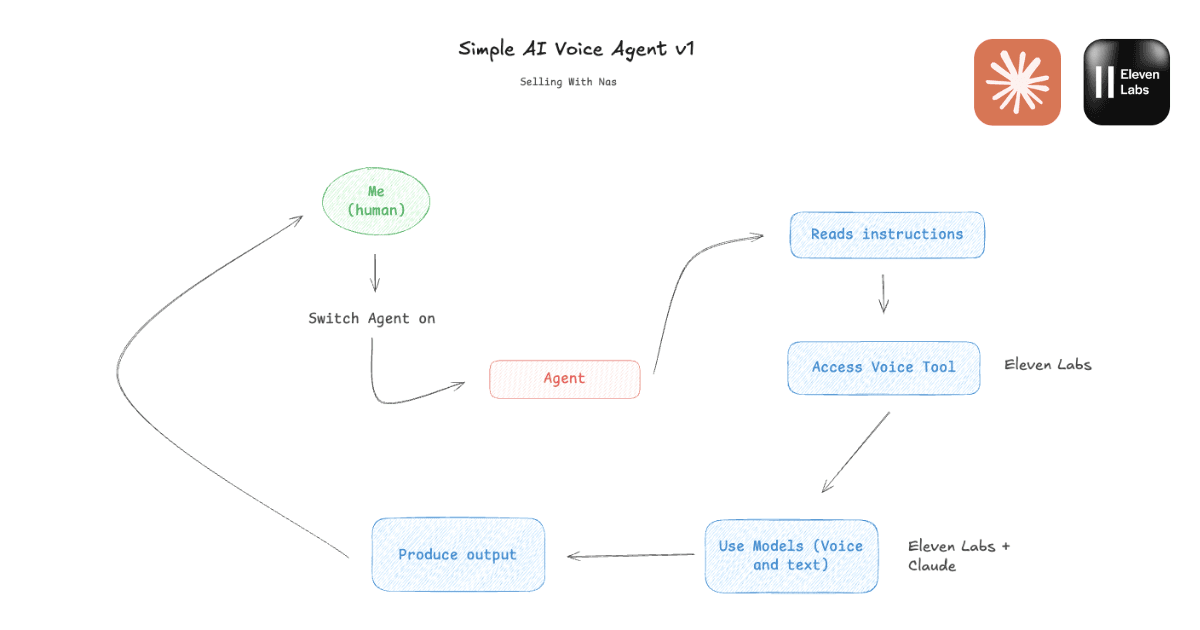
At its core, any AI agent, whether it's a voice agent or something else, has three fundamental components. The first is the model, which handles all the reasoning and generates responses. The second is the set of tools the agent has access to, which extend what the model can actually do beyond generating text. The third is context, meaning the instructions, background information, and personality you give the agent so it knows how to behave in a given situation. What distinguishes a voice agent from a standard text-based assistant is that one of those tools is a voice synthesis model (in our case, provided by ElevenLabs) which converts the agent's text responses into spoken audio before they reach you.
The flow in the demo we are building looks like this: you send a message to Claude, the model processes it using the instructions you have written, it calls the ElevenLabs tool to convert its response into speech, and you receive an audio file you can play back immediately. It is worth being clear that this is not a real-time back-and-forth telephone-style conversation within Claude's desktop app; that kind of infrastructure requires a considerably more substantial deployment. But it is a genuinely impressive prototype that will give you a clear picture of what the technology can do before you consider anything more serious.
If you want to read more about the broader landscape of what AI agents can do for businesses before diving into the technical setup, our guide on AI agents for small and medium businesses covers the five most impactful use cases in depth.
What you will need to get started
The entire setup requires only two accounts and no coding whatsoever. You will need the Claude Desktop app installed on your computer, the desktop version specifically, rather than the browser-based version, because only the desktop app supports the MCP tool connections we will be setting up. You will also need a free account on ElevenLabs, which is where the voice synthesis capability lives.
ElevenLabs' free tier gives you approximately 10 minutes of generated audio per month, which is more than sufficient for the kind of testing and exploration this guide covers. The Claude free plan includes a monthly token allowance that will handle everything in this walkthrough comfortably. Neither account requires a credit card to sign up, so you genuinely can follow this entire guide at no cost.
Building the voice agent: a step-by-step walkthrough
Step 1: Create your ElevenLabs account
Go to elevenlabs.io and sign up for a free account. The process takes about two minutes and just requires an email address. Once you are in, you will land on the main dashboard where you can browse the voice library and explore the platform before we connect it to Claude.
Step 2: Generate your API key
Inside your ElevenLabs account, navigate to your profile settings and find the API Keys section. Generate a new key and copy it somewhere safe; you will need it in the next step. Treat this key like a password: anyone who has it can use your ElevenLabs account and consume your monthly quota, so keep it private and never share it publicly or include it in any code you post online.
Step 3: Connect ElevenLabs to Claude as a tool
Open the Claude Desktop app and navigate to Settings, then look for the Integrations or Connectors section. This is where you add MCP (Model Context Protocol) tools, which are the mechanism that lets Claude access external services like ElevenLabs. Add a new connector, select ElevenLabs from the available options, and paste in the API key you generated in the previous step. Once connected, Claude will be able to call ElevenLabs directly whenever it wants to generate audio as part of a response.
MCP is the open protocol that makes this kind of tool integration possible; it was developed by Anthropic and allows AI models to interact with external services in a structured, secure way. If you want to understand what MCPs are and how they work before going further, this beginner's guide to MCPs and AI agents is a good place to start.
Step 4: Give your agent its instructions
This is where you actually define what your voice agent is and how it behaves. In Claude Desktop, you can set custom instructions that apply to your entire session, or you can paste them directly at the start of a new conversation. We have written a ready-to-use prompt below that turns Claude into a customer service agent for Talk to Me Data, so you can see immediately how a real business use case feels. Copy it, paste it into Claude, and you are ready to go.
You are a friendly and knowledgeable customer service representative for TalkToMeData, a platform for businesses to build, deploy and host AI Agents. Your job is to answer questions about TalkToMeData's services, capabilities, and use cases to our visitors.

Every time you respond, you MUST use the ElevenLabs MCP tool to generate a spoken audio reply - do not just reply in text. Use a warm, professional voice. When I don't specify which voice you have to use, use "Archer" as the default.

Keep answers concise and conversational since they will be spoken aloud. Avoid bullet points or markdown in your spoken responses - write them as natural sentences a person would say.

If you don't know something specific, say so warmly and suggest the user visit talktomedata.com or get in touch directly.

About TalkToMeData:

Businesses can use Talk To me Data to build, deploy and host their AI Agents. Here, they never have to worry about their Claude Tokens, connecting APIs or even having to do any of the setup. It's ideal for small and medium sized businesses who want to automate repetitive tasks from their workflows such as drafting email responses, qualifying leads, reporting and analysis and more.
You can adapt this prompt for any business or scenario you want to test. Swap out the company information for your own, change the voice name to any voice available in your ElevenLabs library, and adjust the tone instructions to match your brand. The logic is the same regardless of the use case: the instructions tell Claude who it is, how to behave, what to know, and when to call the ElevenLabs tool.
Step 5: Test your voice agent
With the instructions in place, start asking it questions. Try asking something like "What does Talk to Me Data actually do?" or "Can you explain how AI agents work for a small business?" and watch Claude process the question, call ElevenLabs, and return a playable audio file. The first time you hear the agent respond in a natural voice, it is a genuinely satisfying moment; it makes the technology feel real in a way that reading about it never quite does.
Ask it to respond in a different language, request a more formal or more casual tone, or try giving it a question it does not know the answer to and see how it handles the uncertainty. That kind of exploratory testing will give you a much better intuition for both the capabilities and the limits of what you have built.
Watch the full walkthrough
If you would prefer to follow along visually rather than reading through the steps, the video below covers the entire process from scratch, including the ElevenLabs setup, the Claude connector configuration, and a live demo of the agent responding to customer questions in real time.
Two important limitations to understand
Before you get too excited about putting this in front of real customers, there are two limitations that are worth being completely honest about.
The first is token usage. Every message you send to Claude consumes tokens from your account's monthly allowance, and because this demo generates both a text response and a voice synthesis call for each interaction, it uses tokens at a faster rate than a standard text conversation. For learning and testing, this is absolutely fine. For handling a meaningful volume of customer interactions, the costs would escalate quickly and the free tier would not come close to covering it.
The second limitation is that this is not a live voice conversation. When Claude responds with the ElevenLabs tool, it generates an audio file that you play back, rather than speaking to you in real time through a microphone and speaker setup. The interaction flow is: you type a question, Claude processes it, ElevenLabs generates audio, and you click play. That is genuinely useful for understanding the technology and for internal demos, but it is categorically different from a customer picking up a phone, speaking to an agent, and hearing a response in under a second. Real-time voice infrastructure requires a whole additional layer of architecture.
If you want to see what a production voice agent (one that handles real calls, integrates with your CRM, and runs continuously without you managing anything) actually looks like, that is what we build at Talk to Me Data. Sign up free and tell us what you need, and we can walk you through what is possible for your specific business.
Other things worth experimenting with
Once you have the basic customer service agent working, the ElevenLabs integration opens up some other genuinely fun capabilities that are worth exploring while you have the setup running.
You can paste any block of text and ask Claude to read it aloud in a specific voice or emotional register, useful for proofreading your own writing in a way that forces you to hear it differently, or for generating rough audio drafts of scripts and presentations. Ask it to respond in Spanish, French, or Japanese and notice how naturally ElevenLabs handles the pronunciation and cadence of a different language without any additional configuration. Try asking it to generate a custom voice from a text description: something like "a calm, authoritative voice that sounds like a senior BBC correspondent" will produce a new synthesised voice within seconds.
You can also give ElevenLabs an audio file and ask it to transcribe it, which turns the tool into a surprisingly capable transcription service. And if you want to push into stranger territory, ask it to generate ambient audio (a coffee shop background, rain on a window, or a quiet office environment), which ElevenLabs can produce even though it is not technically a "voice" task. None of these are things you would build a business process around from Claude Desktop, but they are excellent ways to develop an intuition for what the underlying technology can actually do.
When the demo is not enough: what a real business deployment looks like
There is a meaningful gap between the prototype we built in this guide and a voice agent that a business can actually put to work handling customer interactions. Understanding that gap is useful regardless of whether you are planning to build something yourself or work with a partner to do it.
A production voice agent needs to be accessible through the channel your customers actually use, whether that is a phone number, a website chat widget, a WhatsApp integration, or something else entirely. It needs to run persistently, meaning it is always available rather than requiring a human to start a Claude Desktop session. It needs to handle speech input, which means adding a speech-to-text layer that converts what the customer says into text the model can process. It needs integration with your existing business systems (your CRM, your booking calendar, your product catalogue, your helpdesk) so it can actually do things rather than just talk about them. And it needs monitoring, error handling, and human escalation pathways so that when something falls outside the agent's capabilities, it reaches a person rather than failing silently.
None of this is insurmountably complex, but each layer requires genuine engineering work and ongoing maintenance. At Talk to Me Data, we handle the full stack for businesses that want to deploy AI agents without building and managing that infrastructure themselves. You tell us what the workflow should look like, we build and test the agent, deploy it to your preferred channel, and manage it from that point forward. You use the agent, and we handle everything underneath it. If that sounds like what your business needs, our agents page covers the specific use cases we work on, or you can sign up free and tell us about your specific situation.
You can also use our workflow time savings calculator to get a rough sense of what automating a specific process could be worth for your business before you commit to any conversation.
Frequently Asked Questions
Is this voice agent setup genuinely free to use?
Can I use this setup to handle real customer interactions for my business?
Does the agent respond in real-time, like a phone call?
What voices does ElevenLabs offer?
What does a production-ready voice agent actually require?
Can the agent respond in languages other than English?
Keep reading