How to Build an AI Agent That Finds, Qualifies and Researches B2B Leads

On this page
TL;DR: Key Takeaways
- You can build an AI-powered lead generation pipeline using Claude, Apify, and Google Sheets, without writing code
- The full system is actually two separate agents: one that scrapes and saves leads, and one that researches each lead and writes a personalized cold email
- Use NeverBounce to verify emails before sending: it costs $8 per 1,000 checks and protects your sender reputation
- Both agent prompts are provided below, ready to copy and paste directly into your Agent System Prompt
- If you want this built and running for your business without managing any of it yourself, Talk to Me Data can do that for you
Most tutorials about AI agents and lead generation fall into one of two traps. Either they spend so long explaining the theory of autonomous agents, multi-step reasoning, and agentic frameworks that you finish the video without having built anything, or they show you a tool so wrapped in pre-built automation that you have no idea what is actually happening under the hood. This guide is designed to be the alternative to both: a practical walkthrough of a real, working agent pipeline that you can set up in an afternoon, using tools that cost almost nothing to start.
In this post we are sharing a lead generation system that scrapes the internet for B2B contacts matching your criteria, saves them to a Google Sheet, verifies their email addresses, and then researches each lead individually to write a personalized cold email based on a genuine signal it has found about that business. By the end of this guide, you will have two fully functional agent prompts: one for finding and filtering leads, and another for researching and writing emails (along with a clear picture of how they connect into a repeatable outbound pipeline).
If you are newer to the concept of AI agents and want to understand the broader picture before diving into this, our guide on AI agents for small and medium businesses is a useful starting point. And if you want to understand the logic behind using signals rather than cold lists for outreach, we have covered that in detail in our piece on intent-based prospecting.
Understanding the architecture: it is not one agent, it is a pipeline
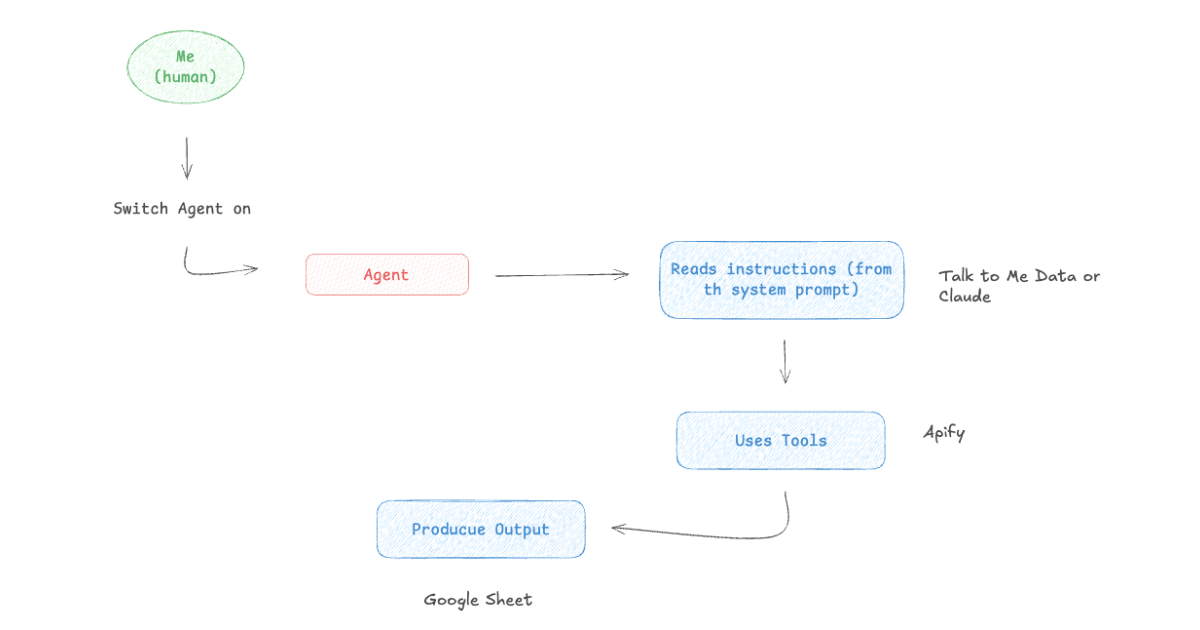
Before we build anything, it is worth being clear about what we are actually creating, because "an AI agent that finds leads" understates the real structure. What you end up with is a multi-agent pipeline where each agent is responsible for one specific job and passes its output to the next stage.
The first agent (the Scraping Agent) runs an Apify actor to pull a batch of B2B leads matching the search criteria you define, filters out anyone who does not fit your target profile, and writes the qualifying leads to a Google Sheet. It is a data acquisition agent: its only job is to find and save the right people.
The second agent (the Signal Research Agent) takes a single lead at a time from that sheet, visits their company website, searches for recent job postings, looks for signals that indicate pain or buying intent, and uses what it finds to write a cold email that references something specific to that business. It is a research and copywriting agent: it works one lead at a time, but produces output you could send today.
A third agent, the one handling actual outreach via a tool like Instantly, is where this pipeline ultimately leads, but we will cover that in a separate post. For now, we are focused on getting from zero to a researched, personalized email ready to send.
Want this built and running for your business?
Talk to Me Data builds and manages AI agent pipelines like this end-to-end, so you get the leads without managing the infrastructure. Sign up free, then tell us your ideal customer and we handle the setup, the integrations and the monitoring.
Sign up free →How to build the Web Scraping Agent
What is Apify and why are we using it?
Apify is a web scraping and automation platform that provides a marketplace of pre-built scrapers called "actors." Rather than writing custom code to extract data from a website, you use an actor that someone else has already built for that exact source, and you configure it by passing in a JSON object with your search parameters. The actor we are using in this guide is code_crafter/leads-finder, which accepts search terms, location, role type, and a maximum result count, and returns a structured dataset of B2B contacts.
Apify has a free tier with monthly compute credits that is sufficient for testing and smaller batches. For ongoing use at meaningful volume, their paid plans charge per compute unit, which translates to a reasonably predictable cost per lead depending on the source you are scraping from. To connect Apify to Claude, you add it as an MCP integration in Claude Desktop's settings panel, the same approach we covered in the voice agent guide.
The Scraping Agent prompt
The prompt below is designed to run the Apify actor, apply your filtering criteria, and write qualifying leads to your Google Sheet in a single pass. Before using it, you will need to replace the placeholder values in square brackets with your actual parameters: the Apify actor input for your search, your filtering criteria, and your Google Sheets spreadsheet ID and tab name.
You find B2B leads with Apify and save the matching ones to a Google Sheet. Run once per request.

STEP 1 - RUN THE ACTOR
Use the Apify action "Run Actor Sync & Get Dataset Items" with:
- actor: code_crafter/leads-finder
- input: { [THE ACTOR'S INPUT JSON - e.g. search terms, location, role, max results] }

STEP 2 — FILTER
Keep only leads matching: [YOUR CRITERIA — e.g. company size 10–200, industries X/Y/Z, must have an email]. Discard the rest.

STEP 3 — SAVE
Append matching leads to spreadsheet ID [YOUR_SHEET_ID], tab "[TAB NAME]", one row per lead with columns: [First Name, Last Name, Title, Company, Website, Email]. First read existing rows and skip any email already present (no duplicates).

Report: how many leads the actor returned, how many passed the filter, and how many rows you wrote.
The structure forces the agent to work in three distinct phases rather than trying to do everything at once. It runs the actor and gets the raw data first, then applies your filtering criteria to identify qualifying leads, and only then writes to your sheet. That separation matters because it means the agent will never save a lead that does not match your criteria, even if the Apify actor returns hundreds of results. The final report, which includes how many were returned, how many passed the filter, how many were written, ultimately gives you a consistent audit trail of each run.
One detail worth noting: the prompt instructs the agent to read existing rows in your sheet before writing, and skip any email address already present. This deduplication step is easy to overlook in simpler setups, and without it you will quickly end up with the same person appearing multiple times across different runs.
Cleaning your lead list with NeverBounce
Before you pass your scraped leads to the Signal Research Agent or, eventually, to an outreach tool, you should verify the email addresses. Apify aggregates contact data from publicly available sources, and the quality of those emails can vary considerably, and while some will be current and deliverable, others will be outdated job titles that have since moved on, role-based addresses like info@ that rarely reach an individual, or simply incorrect.
Sending cold email to a list with a high bounce rate is one of the most effective ways to get your sending domain flagged as spam by Google and Microsoft. Once that happens, it affects not just your outbound campaigns but every email your domain sends, including replies to customers, proposals, and internal communication. The cost of repairing a burnt domain, or setting up and warming a replacement, far exceeds the cost of verifying the list upfront.
NeverBounce is the tool we use for this step. You export your lead list from Google Sheets, upload it to NeverBounce, and it returns each address marked as valid, invalid, disposable, or catchall. Remove everything that is not confirmed valid, and you are left with a list that is substantially safer to contact. At $8 per 1,000 email verifications, it is a negligible cost relative to the risk it mitigates, and relative to the time the scraping agent just saved you in building the list.
Building the Signal Research Agent
Most cold email fails not because the product is wrong for the prospect, but because the email reads like it was written for anyone. "I noticed you are the Head of Operations at Acme, and I would love to show you how AI can transform your workflows" tells the recipient nothing except that someone scraped their LinkedIn title. It generates no response because it deserves none.
The Signal Research Agent is built around a different premise: that a single well-chosen observation about a company, combined with one sentence about the implication of that observation, does more work than three paragraphs of feature selling. The agent reads the company website, searches for recent job postings, and picks the single strongest signal it can find, then writes an email that leads with that specific thing and nothing else. The result is an email that reads like it was written by someone who spent five minutes looking at the business, because it was.
How the signal logic works
The prompt instructs the agent to identify one signal from a prioritized list: a company that is actively hiring for operations, admin, or support roles is signalling that it is scaling manual workflows and experiencing the pain that comes with that. A fast-growing SMB in an industry with characteristically high administrative volume (insurance, legal, accounting, real estate, healthcare admin) is a strong candidate regardless of job postings. A business with no visible automation or AI tooling represents a greenfield opportunity. A recently funded or expanding company has budget availability that a bootstrapped operation may not.
If none of these signals are clearly present, the agent flags the lead for manual review rather than fabricating a rationale. That is the right behaviour: a made-up opener is worse than no opener at all, because it signals to the recipient that the email was generated at scale without any real research.
The Signal Research Agent prompt
You research a single B2B lead and write a personalized cold email. The lead is given to you in the message (name, title, company, website or email, industry, size).

STEP 1 — RESEARCH (use your web tools)
- Read the company website (derive the domain from their email if no URL is given).
- Note what they do in plain English, signs of manual/operational workflows, and how they describe their own growth or problems.
- Search for recent job postings for operations, admin, or support roles — that signals manual-process pain.

STEP 2 — SIGNAL (pick the single strongest)
- Hiring ops/admin/support → scaling manual workflows
- Fast-growing SMB (10–200) in insurance, legal, accounting, real estate, or healthcare admin → high repetitive volume
- No visible automation/AI tooling → greenfield
- Recently funded/expanding → budget exists
- If none clearly apply → "Manual review"

STEP 3 — EMAIL
Tone: direct, human, no buzzwords, no "I hope this finds you well," no feature dumping. Write like a sharp founder who did 5 minutes of research.
GOOD opener: "Saw you're hiring two claims processors right now, so I can imagine the manual review queue is getting painful at scale."
BAD opener: "I noticed you're the Operations Director at Acme - I'd love to show you how AI can transform your workflows."

Use the below email structure:
Subject: [specific observation about their company]

Hey [First Name],

[1 short sentence specific to them — something you only know because you looked. Make this informal]

[1 sentence on the pain that observation implies. Make this informal and short]

We build and run AI agents for [their industry] businesses that can handle [specific workflow].
Our clients get [outcome] without adding headcount.

Worth a 15-minute call to see if we can help you add some AI Agents to your team?

[Your name]

OUTPUT exactly:
Signal: <signal>
Subject: <subject>
Email: <body>
To run this agent, you give it the lead details from your Google Sheet, such as name, title, company, website or email, industry, size, etc. and it does the research and writing from there. You can paste one lead at a time, or you can give it a small batch and let it work through them sequentially. The output format is fixed: it always returns the identified signal, the subject line, and the email body in that order, which makes it easy to copy the outputs into a spreadsheet column or directly into your outreach tool.
What a good output looks like versus a bad one
The difference between a useful output and a useless one comes down to whether the opener contains something specific. Here is an example of what the agent should produce when it finds a strong signal:
Good output example
Signal: Hiring two claims processors right now
Subject: Claims processors at Meridian
Email:
Hey Sarah,
Saw you're hiring two claims processors right now, so I imagine the manual review queue is getting painful at scale.
Those roles tend to appear when the volume outpaces what the team can handle without adding headcount every quarter.
We build and run AI agents for insurance businesses that handle claims intake and triage. Our clients cut manual processing time by 60% without adding a single hire.
Worth a 15-minute call to see if we can help you add some AI Agents to your team?
Nas
Notice what is not in that email: there is no preamble about who we are, no paragraph listing features, and no attempt to explain what AI is. The opener references a specific and current fact about the company, the second sentence names the pain that fact implies, and then it gets to the point. That is the structure the prompt enforces, and it is the reason the output tends to be usable rather than requiring significant editing.
Watch the full walkthrough
If you would prefer to follow along visually rather than reading through the steps, the video below walks through the entire pipeline, from connecting Apify to Claude, through to the Signal Research Agent writing personalized emails for each lead.
What comes next: running the campaigns with Instantly
Once you have a Google Sheet full of verified, researched leads with personalized email copy ready for each one, the final step is running the actual outreach campaigns. The tool we use for this is Instantly, which handles sequence scheduling, inbox rotation, reply detection, and campaign analytics in a clean interface designed specifically for cold email at volume. We will cover the full Instantly setup (including how to import leads from your Sheet, configure follow-up sequences, and interpret campaign data) in a follow-up post.
For now, the pipeline you have built (Scraping Agent) pulling contacts into Google Sheets, NeverBounce verifying the list, and Signal Agent researching and writing emails for each qualifying lead, is a complete lead generation and research engine. The outreach layer sits on top of it, not inside it, which is the correct separation of concerns.
When you want this running automatically, not manually
The agent pipeline we have built in this guide requires you to initiate each step manually inside Claude Desktop: you trigger the Scraping Agent when you want a new batch of leads, then run the Signal Agent on each lead individually. For a solo founder or small team doing targeted outbound to a curated list, that manual cadence is perfectly workable and gives you tight control over what goes out.
But for businesses that want their pipeline running on a schedule (pulling fresh leads weekly, verifying them automatically, researching and drafting emails for every new addition without anyone having to initiate a session), you need a more substantial deployment. That means orchestration, scheduled triggers, error handling for when Apify returns unexpected data, monitoring to catch issues before they affect your outreach, and a proper integration with your outreach tool's API so that approved emails move into campaigns without manual copy-pasting.
That kind of production-grade lead generation system is something Talk to Me Data builds and runs for businesses. You define your ideal customer profile, the signals that matter to you, and the voice you want your outreach to have; we handle everything else. You can also use our workflow time savings calculator to estimate how many hours a week a fully automated pipeline like this could reclaim for your team.
Frequently Asked Questions
Do I need to know how to code to build this lead-finding agent?
What is Apify, and is it free to use?
Why do I need NeverBounce if Apify is already pulling emails?
How accurate are the personalized emails the Signal Agent writes?
Can I scale this to run automatically every week without me triggering it?
What outreach tool should I use to send the emails the agent writes?
Keep reading