How to Grow on Social Media with Claude and an AI Agent

On this page
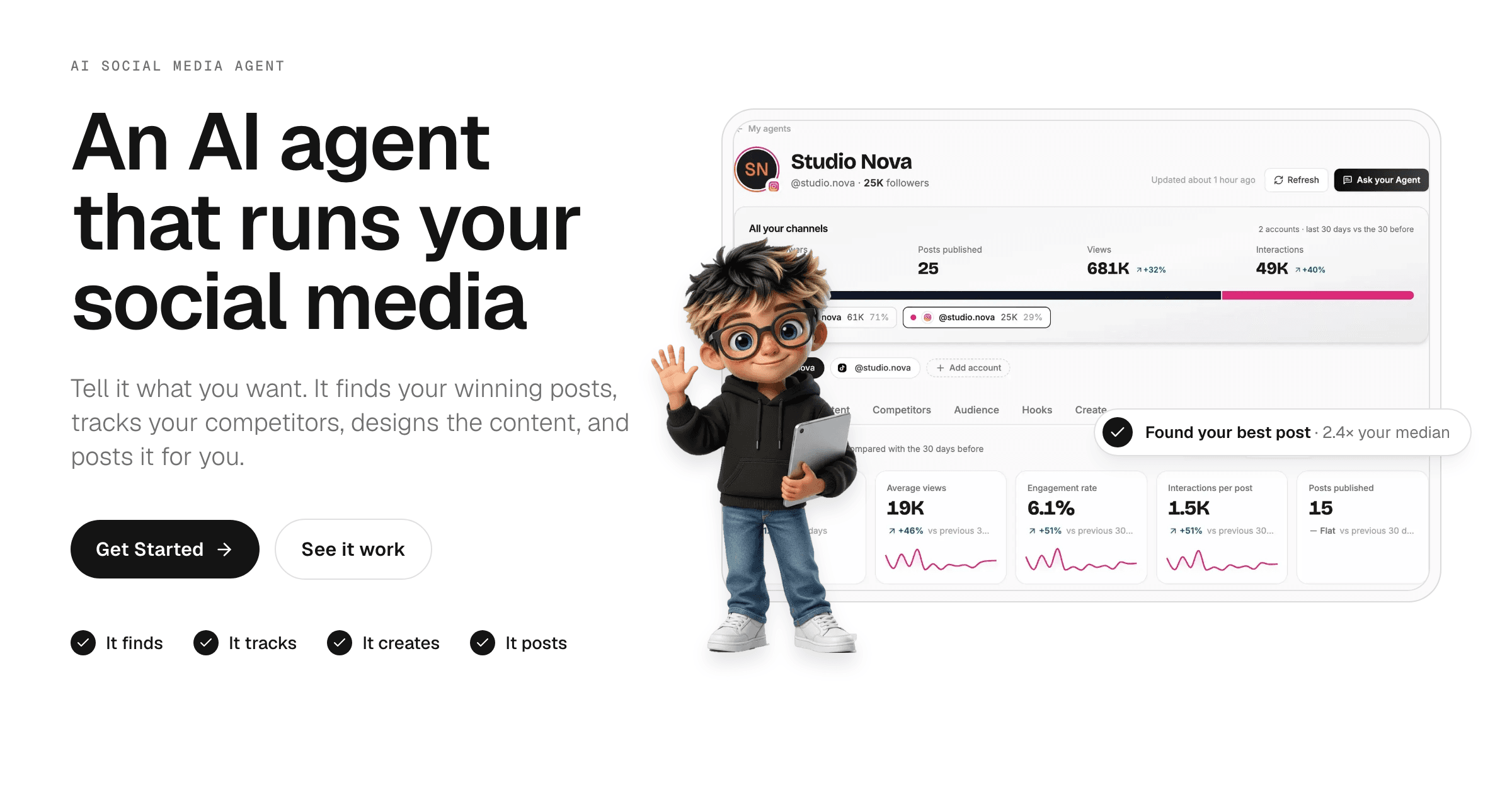
To grow on social media with Claude and an AI agent, let the agent pull every post's views and engagement into one dashboard, find which formats, hooks and posting times beat your own median, and watch which competitor posts break out in your niche. Then use those insights to pick your next posts, and use Claude to build them as carousels and fully edited videos.
In the last six months I've been growing my social media channels, with several videos reaching hundreds of thousands of views. None of those ideas came from staring at a blank page. This guide is the exact system I use to get content ideas that work: how I read my data in the Talk to me Data social media agent, the trick I use to keep an eye on competitors, and how I use Claude to produce the posts themselves.
TL;DR
- Good content ideas start with data, not brainstorming: what already works for you, and what is going viral for others
- Connect your account to a social media AI agent so it pulls every post into one dashboard (the free plan covers 1 account)
- Judge posts against your own median, not raw views: breakouts, formats, best times and engagement rate
- Track competitors and study their breakout posts for formats your audience already wants
- Use the Hooks tab to find your strongest opening and write new hooks in that style
- Build the posts with Claude: carousels with the Web Asset Generator skill, full videos with HyperFrames
Why Should Content Ideas Start With Data?
Content ideas should start with data because your audience has already told you what it wants: in the posts they watched to the end, saved and shared. Most people start by opening Claude and brainstorming. That gives you ideas that sound good to you, not ideas proven to work with your audience.
There are two kinds of data worth using, and an AI agent can collect both for you:
- What already works for you. Which of your own formats, topics, hooks and posting times beat your usual results.
- What is going viral for others. The formats other creators in your niche are using to get far more views than they normally do.
Here is the agent I use, in a 71-second demo, before we go through each step:
In the video: the social media agent pulls an account's posts into one dashboard, finds its winning formats and hooks, tracks competitors, and builds the next posts from that data.
Step 1: Connect Your Account to a Social Media AI Agent
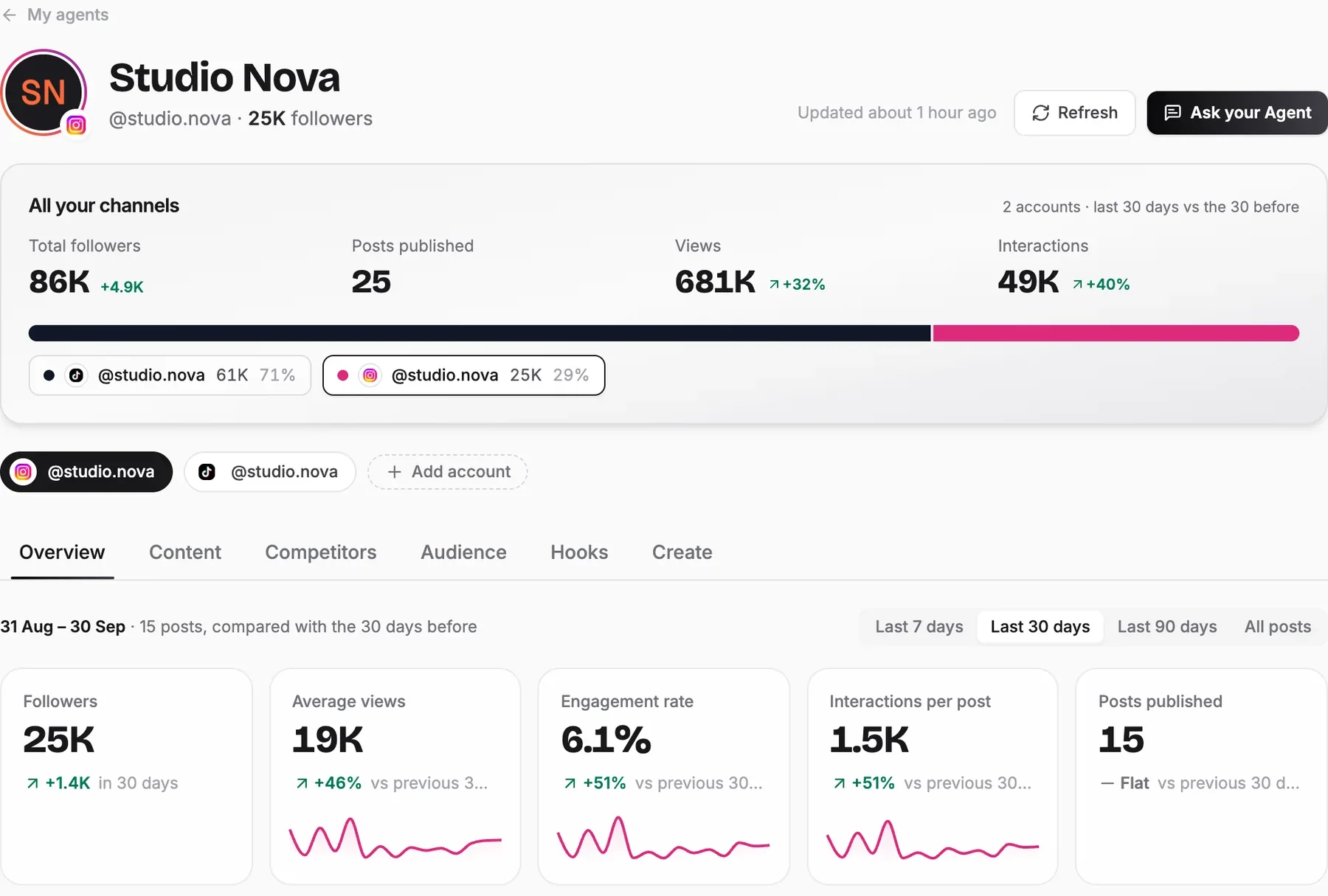
The first step is getting all your numbers in one place without pulling them by hand. You can scroll your Instagram grid and see which videos have the most views, but views are only part of the story. Engagement rate, interactions per post and how each format performs matter more, and going post by post across your whole page to collect them isn't realistic.
In the Talk to me Data social media agent, you sign up, paste your public profile link (Instagram, TikTok, YouTube or a Facebook Page) and the agent reads your posts. Your first analysis is ready in minutes. You don't share a password; you only connect the account through the platform's own sign-in later, if you want the agent to post for you.
Good to know: the free plan connects 1 social account and analyzes your last 10 posts, refreshed once a week. Paid plans add more accounts and a longer post history.
Step 2: How Do You Know Which Posts Are Actually Working?
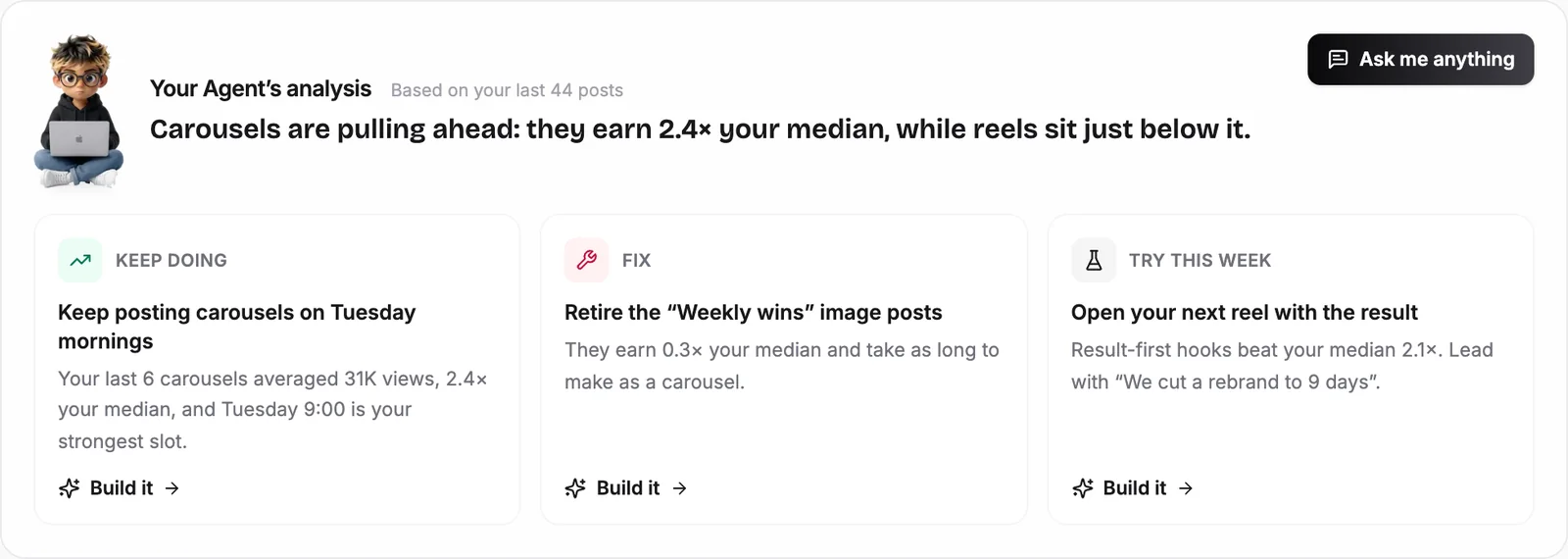
You know a post is working when it beats your own median, not when it gets a big number. A 10K-view video is a win on an account that usually gets 2K and a flop on one that usually gets 50K. The agent measures every post against your usual results and flags the breakouts: posts that did 2× or more.
The Overview tab opens with the agent's verdict in plain English, split into what to keep doing, what to fix and what to try this week:
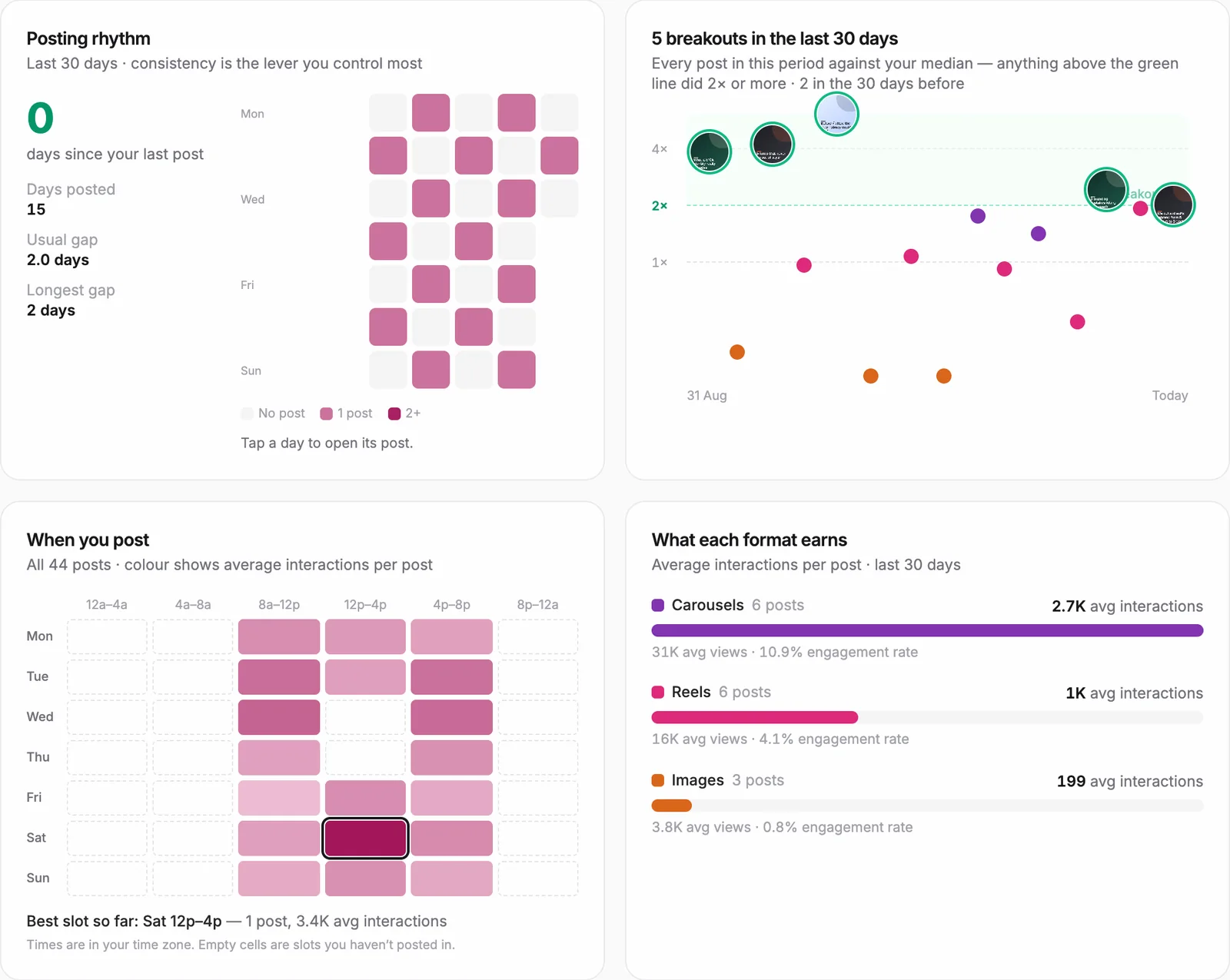
Below the verdict are the charts I check every week:
| Chart | What it tells you | What I do with it |
|---|---|---|
| Breakouts | Every post plotted against your median; anything 2× or more is highlighted | Open each breakout and ask what it had in common with the others |
| What each format earns | Average views, interactions and engagement rate for carousels, reels and images | Shift my posting mix toward the format that earns most |
| When you post | A heatmap of interactions by day and time | Schedule the next big post in my best slot |
| Posting rhythm | Days posted, usual gap and longest gap | Keep the gaps short: consistency is the lever you control most |
In the Content tab you can click any post to open it on the platform and see exactly what it looked like. That matters: a number tells you which post won, but you need to watch it again to see why.
Step 3: Ask the Agent for Data and Content Ideas
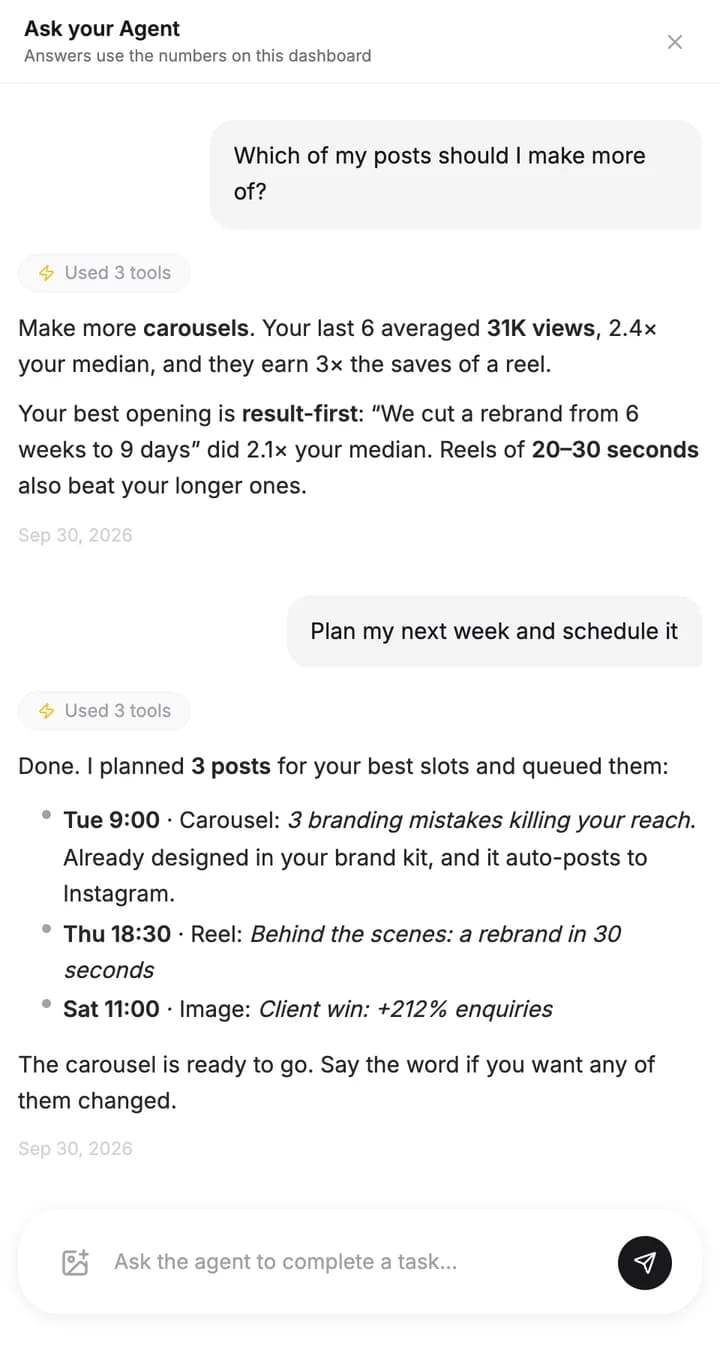
Once the data is in, you don't need to read every chart yourself. Click Ask your Agent and ask in plain English. The answers use the numbers on your dashboard, so they are specific to your account rather than generic advice. The questions I ask most:
- "Which of my posts should I make more of?"
- "Why did my last reel do worse than usual?"
- "Give me a content idea based on my best post, with a script."
- "Plan my next week and schedule it."
Step 4: How Do You Keep an Eye on Competitors' Content?
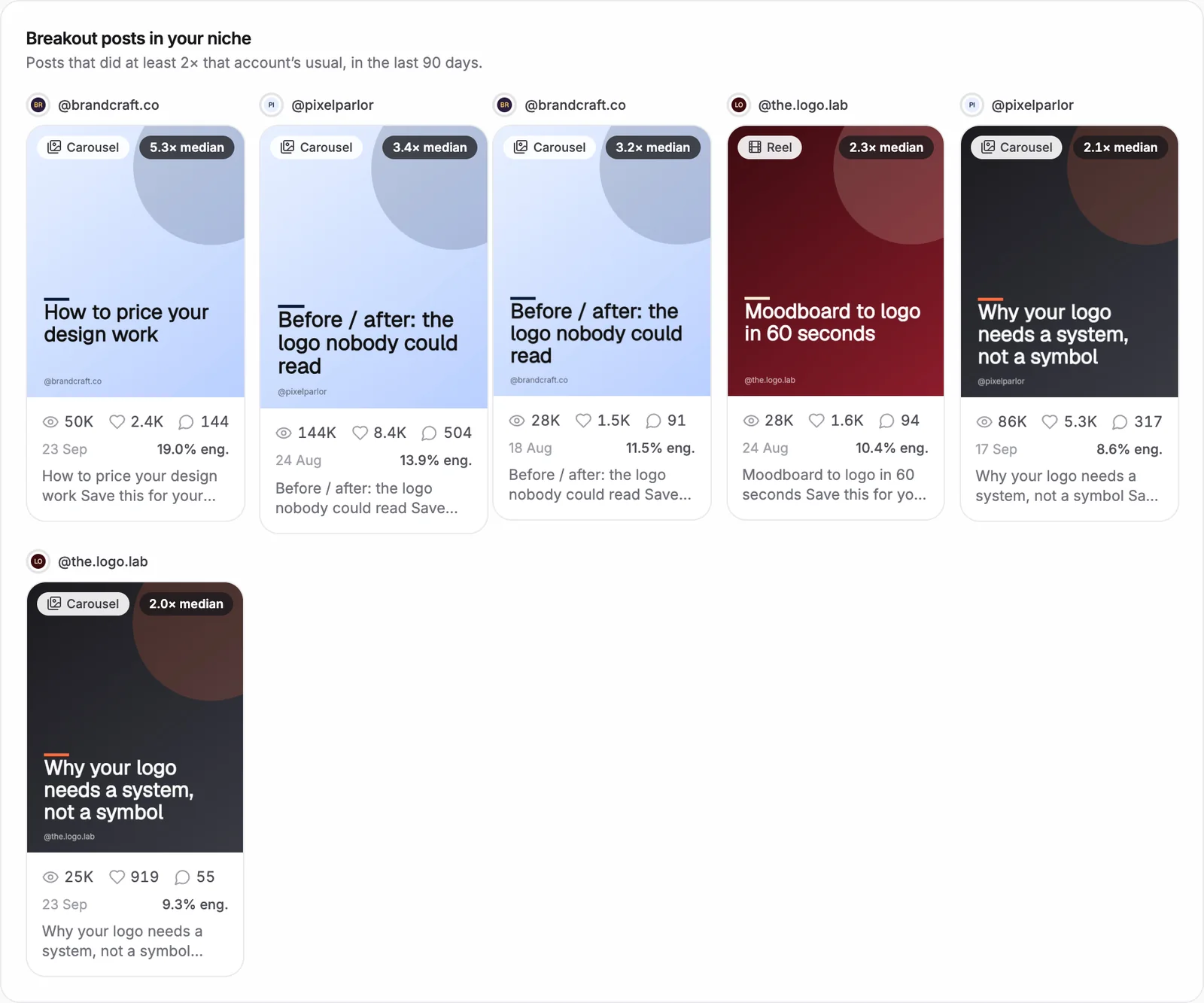
This is the trick I promised. Instead of scrolling competitors' profiles, let the agent track them and surface only their breakout posts: the ones that did at least twice that account's usual views. A breakout tells you a format or topic the audience in your niche already wants. It is inspiration with evidence behind it.
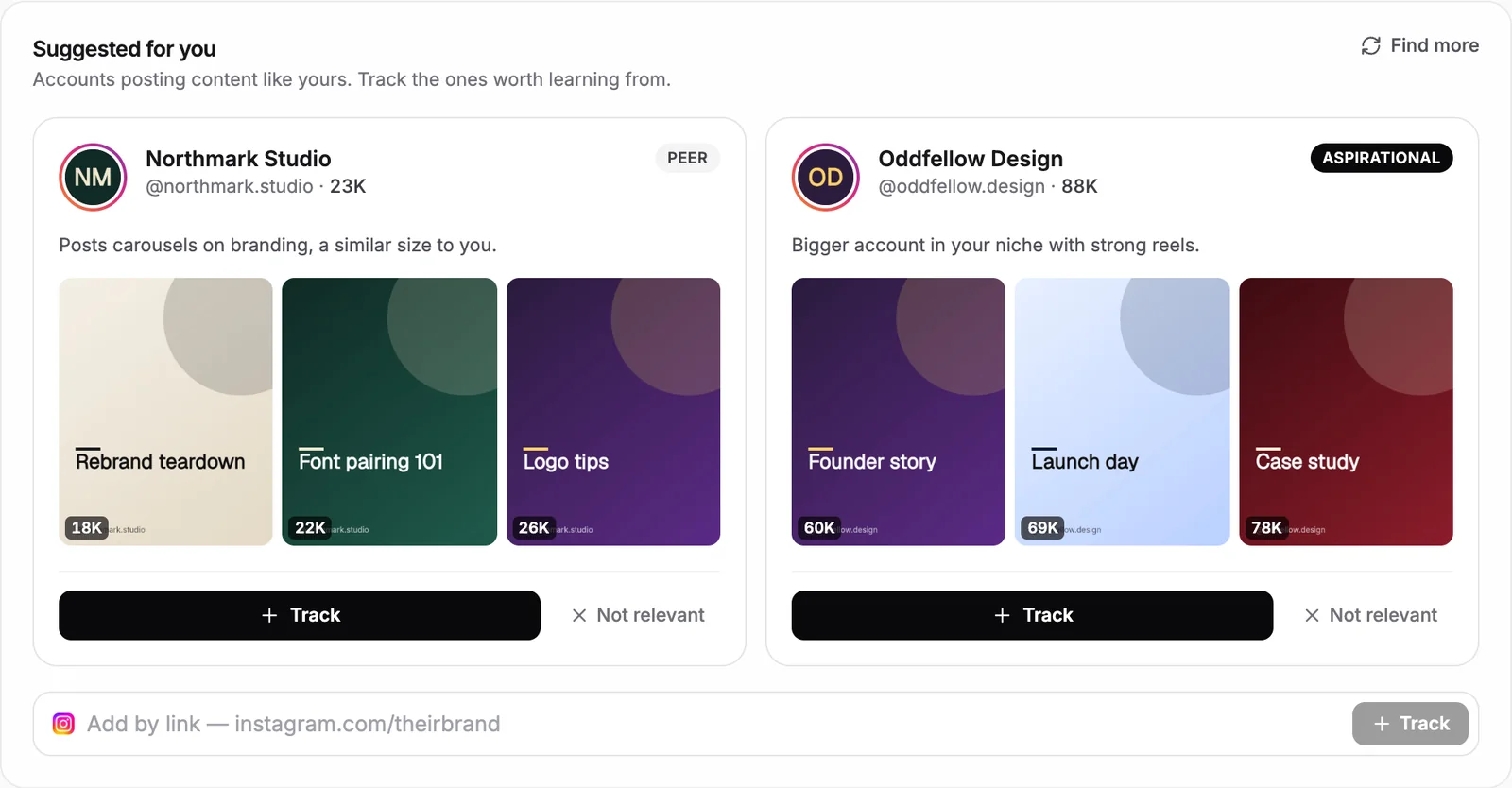
The agent reads your bio and captions to understand your niche, then suggests accounts to track. It labels them as peers (a similar size to you) or aspirational (bigger accounts in your niche). I track a mix of both: peers show what works at my size, aspirational accounts show where the niche is heading. You can also add any account by pasting its link.
Once you track a few accounts, the Competitors tab shows every breakout post in your niche from the last 90 days:
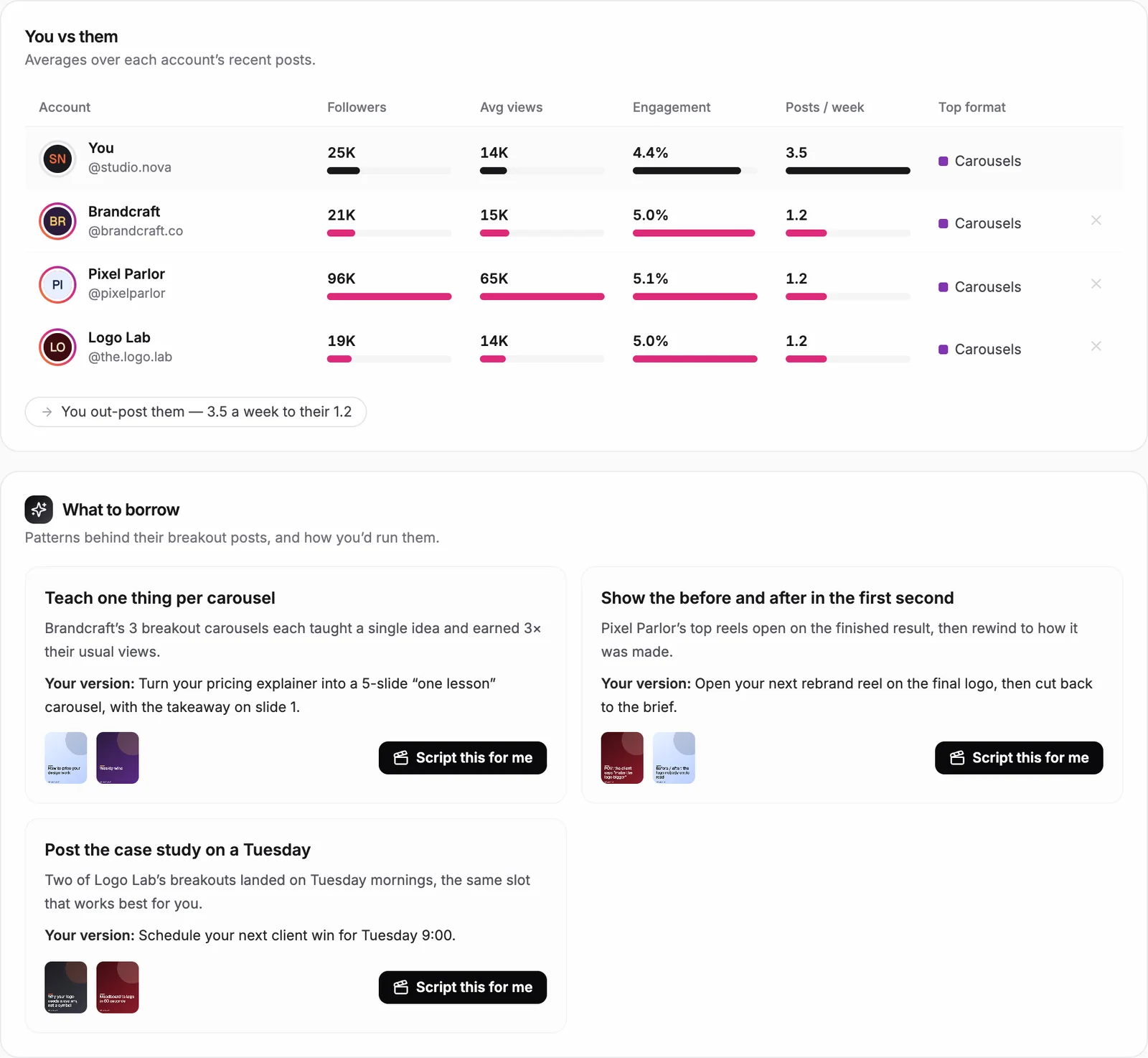
Below that, You vs them compares followers, average views, engagement and posting rate side by side, and What to borrow turns the patterns behind their breakouts into plays you can run. Each play has a Script this for me button that writes your version.
On the free plan you get a preview of competitor tracking; paid plans track 3 to 10 competitors depending on the plan.
Step 5: How Do You Find Hooks That Work?
You find hooks that work by sorting your past openings into styles and scoring each style against your median. The Hooks tab does this for you: it reads how your latest posts open, groups them (result first, question, list, curiosity gap, bold claim, how-to, POV) and shows how each style performed.
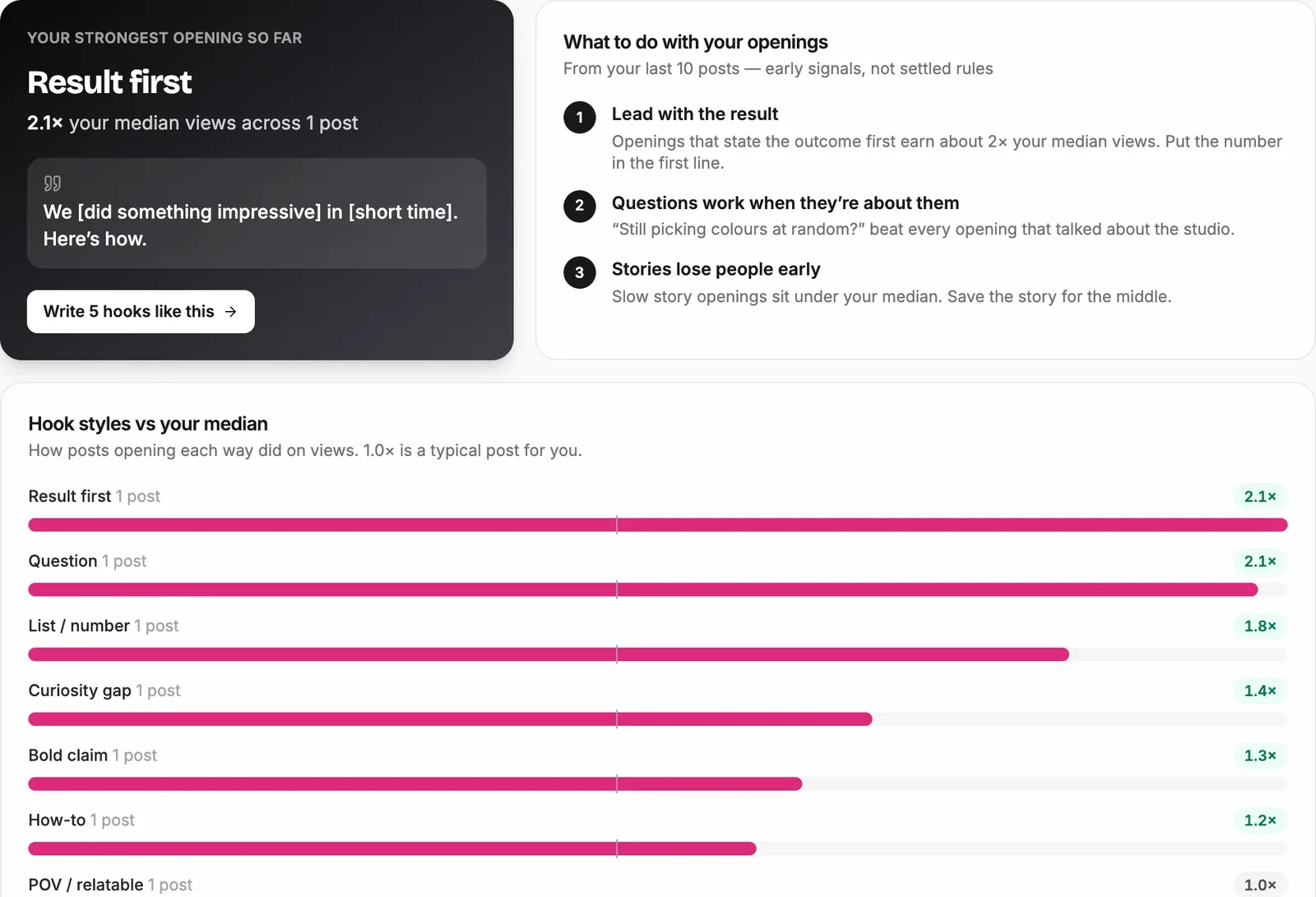
The top card turns your best opening into a fill-in-the-blank formula, such as "We [did something impressive] in [short time]. Here's how." Click Write 5 hooks like this and the agent writes five new hooks in that style about your topics. Read the "what to do with your openings" notes too: they tell you which openings to stop using, which is just as useful.
With only a few posts per style, treat these as early signals rather than rules. The more you post, the more reliable the scores get.
Step 6: Turn the Insights Into a Content Plan
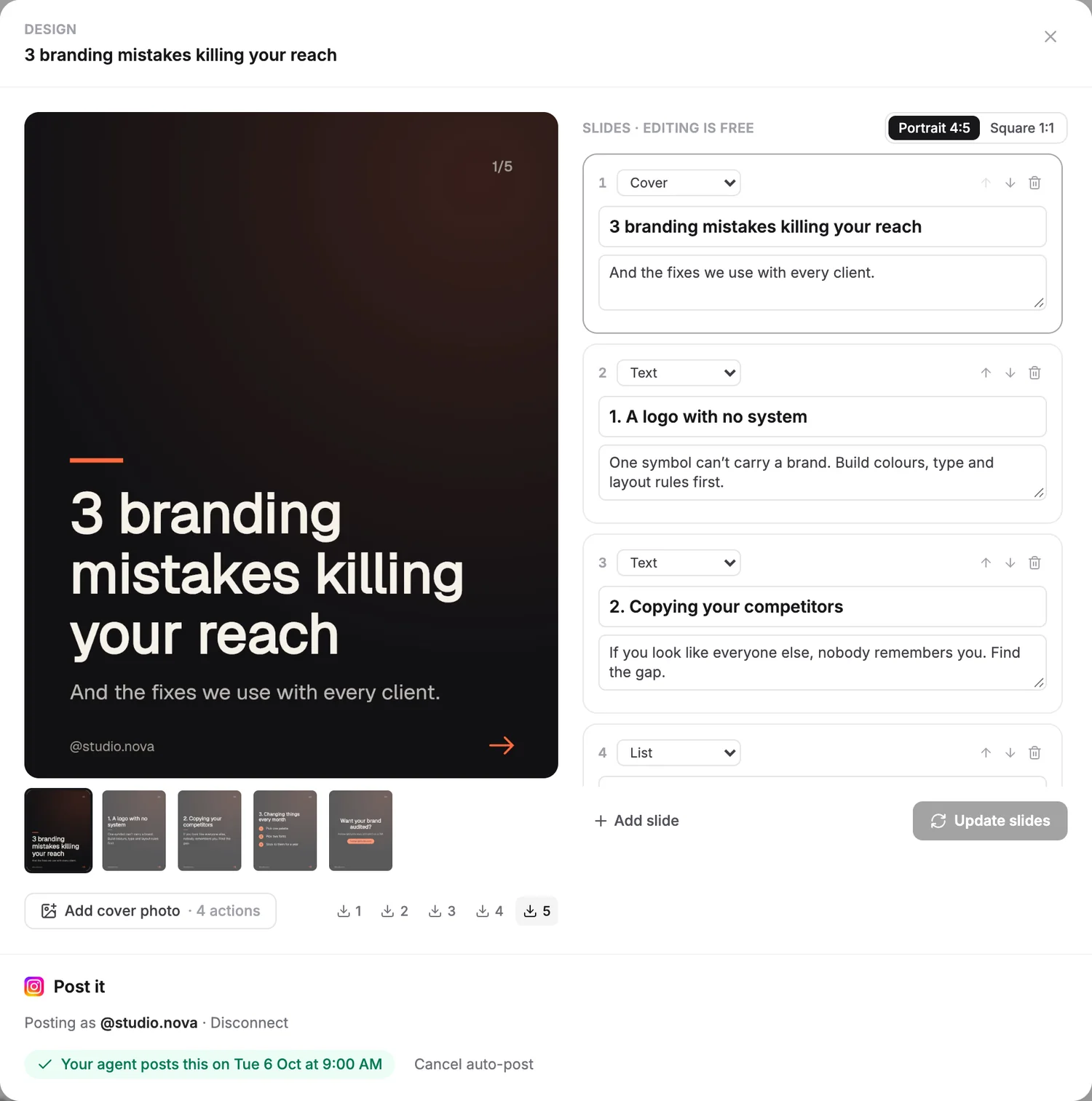
The Create tab is where the data turns into posts. Type what you want ("a 15 second reel on my morning routine") or click Build it on any insight, and the agent writes a post kit: hook options, script and caption, and for carousels, the designed slides in your brand kit. Every post lands in your plan at your best time slot, with a "why this" line that ties it back to your data.
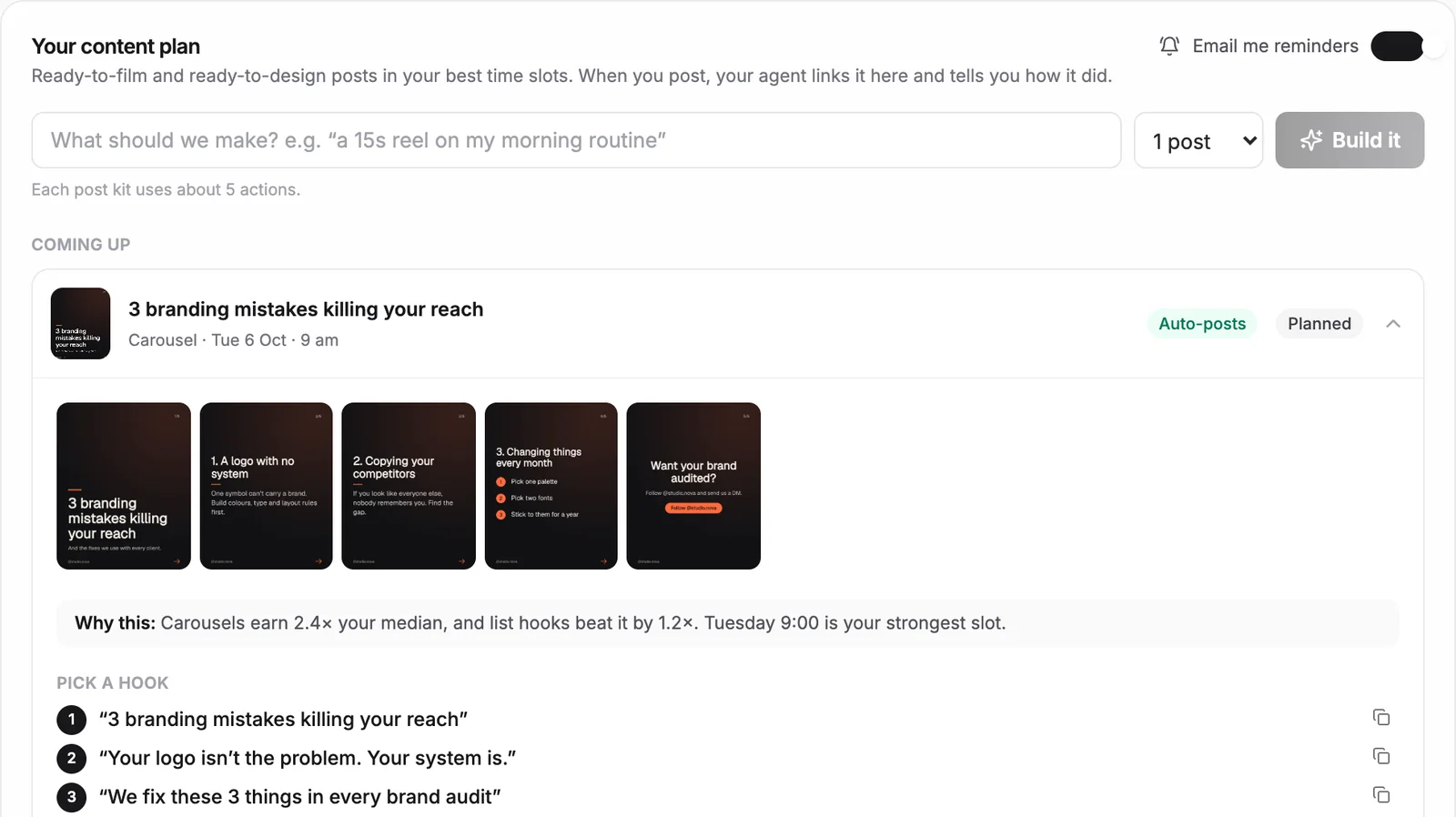
You can edit any slide, switch between portrait and square, and either let the agent auto-post to Instagram, Facebook or TikTok or get an email reminder to post it yourself. Building and posting finished content is part of the paid plans.
How Do You Make Carousels With Claude?
If you prefer to design posts yourself, Claude can build carousel slides with the Web Asset Generator skill, which creates image files from a description. Take a hook and the three points from your agent's plan, paste them into the prompt below, and Claude produces one image per slide in your brand colors.
Use the web-asset-generator skill to design a 5-slide Instagram carousel.

Size: 1080 x 1350 px (portrait 4:5), one PNG per slide.
Brand: background [#141414], text [white], accent [#FF5A1F], font [a bold sans serif].
Show my handle [@yourhandle] bottom left on every slide.

Slides:
1. Cover: "[the hook your agent picked]" with the subtitle "[one short line]"
2. "[Point 1]" plus one sentence that explains it
3. "[Point 2]" plus one sentence that explains it
4. "[Point 3]" plus one sentence that explains it
5. Call to action: "[e.g. Follow for more / Comment AUDIT and I'll DM you]"

Rules:
- No more than 20 words on any slide. Big type, plenty of space.
- Same layout on every slide. Number them 1/5 to 5/5, top right.
- Save them as slide-1.png to slide-5.png in this folder, then show me a preview.
The important part is what goes into the brackets. A carousel built on a hook that already beat your median, in the format your data says earns most, starts with an unfair advantage over one built from a brainstorm.
How Do You Edit Full Videos With Claude?
For video, I use HyperFrames, an open-source video framework from HeyGen. You install it as a plugin in Claude Code, describe the video you want (length, format, assets and call to action), and Claude writes the video as code and renders it to an MP4. I use it to edit full social media videos from a single prompt, and it keeps the cost to your Claude plan, with no per-render fees. Keep videos under 30 seconds to save usage.
I wrote a full tutorial, including the install commands and the prompts I use: how to build free AI videos with Claude and HyperFrames.
Summary
Growing on social media with Claude and an AI agent comes down to a loop. Let the agent pull your data and compare every post with your own median. Find your winning formats, best times and strongest hooks. Track competitors and borrow the patterns behind their breakout posts. Then use the plan to build the next posts, with the agent, with Claude and the Web Asset Generator skill for carousels, or with HyperFrames for full videos.
For a deeper look at the automation side, read our guide on how to automate social media posting with an AI agent, or build your own analysis agent with the prompt in how to build a social media AI agent.
Frequently Asked Questions
Can Claude analyze my Instagram or TikTok analytics?
Is the Talk to me Data social media agent free?
Which platforms does the social media agent work with?
How do I find out what's working for my competitors?
Which metrics matter most for growing on social media?
Can Claude edit full social media videos?
Keep reading