How to Build a Social Media AI Agent for Instagram (With the Exact Prompt to Copy)
Most social media advice tells you to "post consistently" and "know your audience.", but what it doesn't tell you is how to find the patterns inside your own account that actually predict what performs, and how to use those patterns to systematically generate content ideas that are more likely to work.
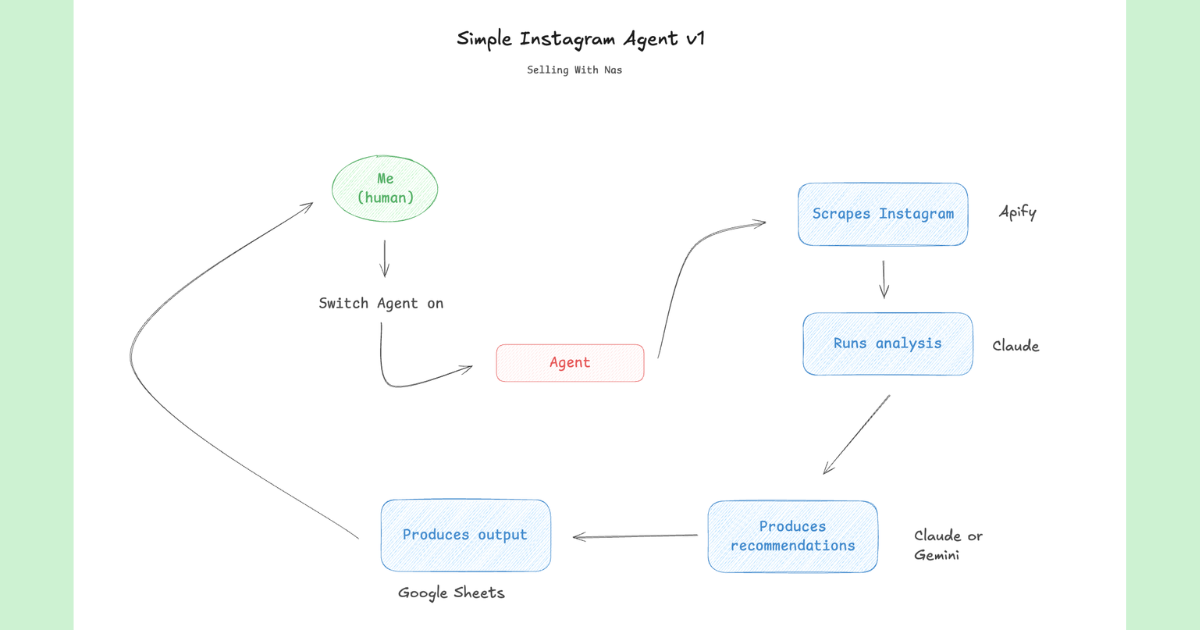
That's what this agent does. It scrapes your own Instagram posts, ranks them by performance, extracts the hooks and topics from your top performers, generates 10 new content ideas modeled on those winners, and logs everything to a Google Sheet - without you touching a single spreadsheet. And yes, of course you can also run the same Agent to look at your competitors' or inspiring creators' accounts.
TL;DR
- The agent scrapes your last 40 Instagram posts using Apify
- Ranks them by views, then engagement rate, and identifies your top ~10 performers
- Extracts the hooks and topics that keep appearing in your best content
- Generates 10 new ideas, each with a ready-to-use hook and reasoning
- Writes everything to a Google Sheet, deduplicating against existing rows
- Works with Claude (Pro or API) using Apify and Google Sheets integrations
What a Social Media AI Agent Actually Does
A social media AI agent is different from asking ChatGPT to "write me 5 Instagram captions." The difference is data it uses, because instead of generating generic content based on what it was trained on, this agent starts from your specific account - your actual posts, your actual performance numbers, your actual audience's reactions.
The result is content ideas that are modeled on what has demonstrably worked for you, not what works for some average creator in your niche. Your top performers become the training set for your next batch of content, meaning the likelihood of better engagement is higher.
It also builds institutional knowledge. Every time the agent runs, your Google Sheet grows - your winning patterns get documented, your top hooks get archived, and new ideas get logged alongside the reasoning behind them. Over time, you end up with a living content strategy document that gets smarter every week.
What You Need to Set It Up
Claude Pro or API access
The agent uses Claude with tool use enabled. Claude Pro works if you connect the Apify and Google Sheets MCP integrations. API access works if you're building a more automated setup.
An Apify account
Apify runs the Instagram scraper. They have a free tier ($5/month of compute credit) which covers many runs. The Instagram scraper actor is pre-built — you don't need to configure anything beyond the input fields the prompt specifies.
A Google Sheet
Create a new spreadsheet and add a tab called "Content Analysis." The agent will create three blocks inside it: Top Performers, Winning Patterns, and New Ideas. Copy the Sheet ID from the URL (the long string between /d/ and /edit).
Your Instagram handle
Your public Instagram username. The account needs to be public for the scraper to access it. If your account is private, you'll need to use Apify's authenticated scraping options.
Don't want to set all of this up yourself?
Talk to Me Data builds and deploys agents like this for businesses - fully connected to your accounts, running on a schedule, with no API keys, integration config, or maintenance on your side.
Book a free call to get it built for you →How the Agent Works - Step by Step
Step 1 - Scrape your posts
The agent calls the Apify Instagram scraper with your handle and pulls your last 40 posts. For each post it retrieves the caption, post URL, publish date, view count, like count, and comment count. Reels and videos take priority in the analysis since they typically carry more distributable reach than static images.
Step 2 - Rank and analyze
Posts are ranked by views first (reach), then by engagement rate - calculated as (likes + comments) / views. This two-tier ranking separates posts that were broadly distributed from those that generated genuine audience interaction. The top ~10 performers become the analysis set.
For each top performer, the agent extracts the hook: the first line or first ~10 words of the caption. It can't see the video itself, but the hook is usually the most influential variable anyway as it's what determines whether someone stops scrolling. Patterns across hooks are identified: questions, numbers, "how to" frames, bold claims, contrarian angles.
Step 3 - Generate 10 new ideas
Using the winning patterns as a template, the agent generates 10 new content ideas. Each idea comes with a ready-to-use hook (written in the style of your top performers), the topic and angle, and a one-line explanation of which winning pattern it echoes and why it should work. These aren't generic suggestions - they're modeled on what your specific audience has responded to.
Step 4 - Log to Google Sheets
The agent reads your existing Sheet first (Batch Get) to avoid duplicating posts already logged. It then writes three structured blocks: Top Performers (one row per post with all performance data), Winning Patterns (the recurring hooks and topics), and New Ideas (the 10 new ideas with hooks and reasoning). The Sheet becomes your running content strategy document.
The Prompt
Paste this directly into your AI Agent orchestration interface - whether it's Talk to Me Data or Claude Project. Before running, replace [YOUR_HANDLE] with your Instagram username and [YOUR_SHEET_ID] with the ID from your Google Sheet URL. Make sure your Apify and Google Sheets integrations are connected in Claude's settings.
You analyze the user's own Instagram content, surface what works, and propose new ideas modeled on the top performers. Run once per request.

STEP 1 - SCRAPE
Use the Apify action "Run Actor Sync & Get Dataset Items":
- actor: apify/instagram-scraper
- input: { "directUrls": ["https://www.instagram.com/[YOUR_HANDLE]/"], "resultsType": "posts", "resultsLimit": 40 }
(Confirm the field names against the actor's Input tab.)

STEP 2 - ANALYZE (focus on reels/videos)
- Rank posts by performance: views first, then engagement rate ((likes + comments) / views).
- Identify the TOP ~10 performers.
- Best hooks: extract the first line / first ~10 words of each top post's caption - this is the textual hook (you cannot see the video). Note recurring patterns: questions, numbers, bold claims, "how to", contrarian takes, etc.
- Best topics/formats: the themes and formats that appear most among the top performers.

STEP 3 - GENERATE IDEAS
Propose 10 new content ideas modeled on the winners. For each: a ready-to-use hook written in the style of your top performers + the topic/angle + one line on why it should work (which winning pattern it echoes).

STEP 4 - WRITE TO SHEET (spreadsheet [YOUR_SHEET_ID], tab "Content Analysis")
- Block A "Top Performers": one row per top post — Date, URL, Topic, Hook, Views, Likes, Comments, Engagement Rate.
- Block B "Winning Patterns": the recurring hook styles + topics.
- Block C "New Ideas": the 10 ideas — Hook, Topic/Angle, Why it works.
Read existing rows first (Batch Get) and don't duplicate posts already logged.

Finish with a short chat summary: the top 3 hooks and your 3 strongest new ideas.
How to Connect the Integrations
Apify
- Create a free account at apify.com
- Go to Settings → Integrations and copy your API token
- In Claude, go to Settings → Integrations → Apify and paste the token
- The agent will then be able to call the Instagram scraper actor directly
Google Sheets
- In Claude, go to Settings → Integrations → Google Drive / Sheets and authorize your Google account
- Create a new Google Sheet and add a tab named exactly "Content Analysis"
- Copy the Sheet ID from the URL: it's the string between
/d/and/edit - Replace
[YOUR_SHEET_ID]in the prompt with that value
What You Get Out of It
| Output | Where | What it contains |
|---|---|---|
| Top Performers | Sheet, Block A | Date, URL, Hook, Views, Likes, Comments, Engagement Rate |
| Winning Patterns | Sheet, Block B | Recurring hook styles, topic categories, format types |
| New Content Ideas | Sheet, Block C | 10 hooks, topics, and reasoning for each idea |
| Chat Summary | Claude reply | Top 3 hooks + 3 strongest new ideas at a glance |
Tips for Customising the Prompt
Change the platform
Apify has scrapers for TikTok, LinkedIn, YouTube, and most other platforms. Swap the actor ID in Step 1 and adjust field names in Steps 2 and 4 to match what each scraper returns.
Increase the post sample
Change "resultsLimit": 40 to 80 or 100 for a larger sample. More data means more reliable pattern detection, though it increases processing time slightly.
Add competitor analysis
Add a second scrape call in Step 1 with a competitor's handle. In Step 2, instruct the agent to compare their top performers against yours and identify gaps - topics they're winning on that you haven't covered.
Generate more ideas
Change "Propose 10 new content ideas" in Step 3 to 20 or 30. You'll get a larger bank to pull from when planning your content calendar.
Automate it on a schedule
Using the Claude API, you can wrap this in a cron job that runs every Sunday night so your Sheet updates automatically. The deduplication logic in Step 4 ensures you never log the same post twice. If you'd rather skip the infrastructure entirely, Talk to Me Data handles the scheduling, hosting, and monitoring for you.
Want this built for you?
We can build and deploy this agent for your business.
If you'd rather have a production-ready version — connected to your accounts, running on a schedule, with monitoring and error handling — we build these for clients. Book a free call to discuss what that looks like.
Book a free call →Frequently Asked Questions
Summary
A social media AI agent shifts content strategy from guesswork to data. Instead of generating ideas based on vague intuition about what your audience likes, you start from performance evidence - your actual top posts - and work outward from there.
The agent handles the tedious parts: pulling data, ranking posts, identifying hook patterns, generating ideas, and logging everything to a Sheet. You get a structured, up-to-date content strategy document every time you run it, and a batch of ready-to-use hooks that are grounded in what's actually worked on your account.
The prompt above is ready to use. Replace the two placeholders, make sure your integrations are connected, and run it. The first time you see your own patterns laid out in a Sheet, it's genuinely surprising how clear the signal is.
Want a custom AI agent built for your business?
We build, deploy, and host AI agents tailored to your workflows. Book a free 20-minute call and we'll walk through what's possible.
Book a free call →