How to Increase Website Conversion Rate in 30 Days (No Redesign Required)


On this page
TL;DR: Key Takeaways
- You can achieve 15-30% conversion rate improvements in 30 days without a complete redesign
- The 30-Day Sprint Method focuses on high-impact, low-effort changes first
- Week 1: Low-hanging fruit (headlines, CTAs, trust signals) can improve conversions by 10-15%
- Week 2-3: Technical optimizations (speed, mobile, forms) add another 8-12% improvement
- Week 4: Testing and refinement solidifies gains and identifies next opportunities
- Most improvements require only copywriting, configuration changes, or minor CSS adjustments
What is the 30-Day Conversion Sprint Method?
The 30-Day Conversion Sprint is a structured optimization methodology that delivers measurable conversion rate improvements without requiring website redesigns, major development work, or significant budget allocation. This approach prioritizes changes based on implementation effort versus expected impact, allowing businesses to achieve 15-30% conversion rate improvements in a single month.
Unlike traditional conversion optimization that can span 3-6 months, the Sprint Method compresses timelines by focusing exclusively on changes that meet three criteria: (1) implementable within 1-3 days, (2) no backend development required, and (3) proven impact based on industry data. This creates rapid momentum while building organizational confidence in optimization as a growth strategy.

Why Can You Increase Conversions Without a Redesign?
Research from Baymard Institute shows that 68.8% of e-commerce shopping carts are abandoned due to factors unrelated to design: complicated checkout processes (17%), unexpected costs (48%), account creation requirements (24%), and security concerns (18%). Similarly, B2B and SaaS conversion issues predominantly stem from unclear value propositions, slow page speeds, and friction in conversion paths, all fixable without redesigning a single page.
The misconception that conversion optimization requires redesign costs businesses millions in delayed improvements. Consider these statistics:
- Average redesign timeline: 3-6 months from planning to launch
- Average redesign cost: $15,000-$50,000 for small-to-medium businesses
- Redesign conversion improvement: Often neutral or slightly negative initially due to user adaptation period
Meanwhile, targeted optimizations using existing design frameworks can be implemented in days or weeks, cost little to nothing, and produce immediate measurable results. You're not avoiding a redesign because it's bad; you're prioritizing faster ROI through proven quick wins.
The shortcut
The fastest conversion lift? A dedicated agent that handles hesitation in real time
The 30-day sprint fixes problems you can already see. But the biggest conversion leak is invisible: visitors who almost converted: they read your page, got interested, had one unanswered question, and left.
A conversion-focused AI agent sits on your landing page and intercepts that moment. It doesn't wait for visitors to fill in a form; it meets them at the exact point of hesitation and converts them before they bounce.
- Answers hesitation questions on the spot. "Does this work for e-commerce?" "What's the pricing?" "How long does setup take?", handled instantly, without a human in the loop.
- Captures leads before the exit. When a visitor scrolls back up or pauses, the agent checks in. If they're not ready to buy, it collects their email and follows up automatically.
- Removes the objections that cause bounces. Pricing confusion, trust gaps, unclear fit: the agent addresses all three in real time, grounded in your actual product info and FAQs.
- Books calls with high-intent visitors. Visitors who ask detailed questions are your warmest leads. The agent recognises intent signals and offers a call slot before they close the tab.
Your 30-day sprint improves the page. The agent improves every conversation that happens on it. They compound, and together, you're not leaving a single basis point of conversion on the table.
The 30-Day Sprint Framework Overview
The framework divides into four weekly sprints, each with specific focus areas and success metrics. This structure ensures systematic progress while preventing overwhelm.
| Week | Focus Area | Expected Impact | Time Investment |
|---|---|---|---|
| Week 1 | Copy, CTAs, Trust Signals | +10-15% | 8-12 hours |
| Week 2 | Speed & Mobile Optimization | +5-8% | 10-15 hours |
| Week 3 | Form & Path Simplification | +3-7% | 8-12 hours |
| Week 4 | Testing & Refinement | Validation | 5-8 hours |
Week 1: How to Optimize Copy and Trust Signals for Immediate Impact
Week 1 focuses on the highest-impact, lowest-effort changes. These modifications require no technical implementation, just better copywriting and strategic placement of trust elements. You'll spend 8-12 hours this week on changes that typically improve conversions by 10-15%.
Day 1-2: Headline and Value Proposition Optimization
Your headline is the first thing 100% of visitors see. A unclear or weak headline loses 50-70% of visitors immediately.
Action Steps:
- Apply the 5-Second Test: Show your homepage to someone unfamiliar with your business for 5 seconds. Ask them: "What does this company do?" If they can't answer accurately, rewrite your headline.
- Use the Value Formula: [Specific Outcome] + [Timeframe] + [For Whom]
Example: "Increase your website traffic by 50% in 90 days, for B2B SaaS companies" - Remove jargon and buzzwords: Replace "synergistic solutions" with concrete benefits. Replace "revolutionize" with specific outcomes.
- Add social proof to headlines: "Join 10,000+ founders" or "Trusted by Fortune 500 companies"
❌ Before (Conversion Rate: 2.1%):
"Leading provider of enterprise-grade digital transformation solutions"
✓ After (Conversion Rate: 3.2%):
"Reduce IT costs by 40% with automated cloud migration, trusted by 500+ enterprises"
Day 3-4: CTA Button Optimization
Call-to-action buttons are conversion gateways. Small changes produce outsized results. Changing "Submit" to "Get My Free Analysis" increased conversions by 38% in one documented case study.
CTA Optimization Checklist:
- Use first-person language: "Start My Free Trial" outperforms "Start Your Free Trial" by 90% (research by Michael Aagaard)
- Be specific about outcome: "Get My Website Report" beats generic "Submit" or "Click Here"
- Remove friction words: Avoid "Submit," "Buy Now," or "Purchase"; use "Get," "Start," "Access," "Unlock"
- Add urgency/value: "Get Free Analysis (Takes 60 Seconds)" clarifies both value and effort
- Ensure visibility: Primary CTA should be visible without scrolling (above the fold) on both desktop and mobile
- Use contrasting colors: CTA button should be the highest-contrast element on the page
Day 5-7: Trust Signal Implementation
Trust signals reduce purchasing anxiety and establish credibility. Adding trust signals increased conversions by 42% in a Baymard Institute study.
Priority Trust Signals (implement in order):
- Customer testimonials with photos and full names: Generic testimonials ("Great product! - John") have minimal impact. Specific testimonials with photos, full names, and concrete results increase trust by 89%.
- Security badges near forms/checkout: SSL certificates, payment security icons (Norton, McAfee, TRUSTe) placed near sensitive input fields
- Client logos (B2B): Display recognizable company logos. "As seen on" badges for media mentions
- Money-back guarantee: Explicit, unconditional guarantees ("100% Money-Back Guarantee, No Questions Asked") reduce risk perception
- Live chat or visible contact information: Accessible human support increases trust, especially for high-value purchases
Week 1 Quick Win:
If you only have 2 hours this week, focus on rewriting your headline and primary CTA button. These two changes alone can produce 5-8% conversion improvements.
Week 2: How to Optimize Website Speed and Mobile Performance
Week 2 tackles technical performance issues. While these require more technical knowledge than Week 1 changes, they're still implementable without redesign. Expected improvement: 5-8% conversion rate increase.
Day 8-10: Page Speed Optimization
Google reports that 53% of mobile users abandon sites taking longer than 3 seconds to load. Every 100ms improvement in load time increases conversions by 1%.
Immediate Speed Wins (No Developer Required):
- Image compression: Use TinyPNG or Squoosh to compress all images by 70-80% without visible quality loss. This single change typically improves load time by 1-2 seconds.
- Remove unnecessary plugins/scripts: Audit third-party scripts (analytics, chat widgets, ad trackers). Each additional script adds 0.5-1 second load time. Disable any not actively contributing to conversions.
- Enable caching (WordPress/CMS): Install WP Rocket (WordPress) or enable built-in caching. Reduces server response time by 40-60%.
- Use a CDN: Cloudflare's free tier distributes content globally, reducing load time for international visitors by 30-50%.
Measurement:
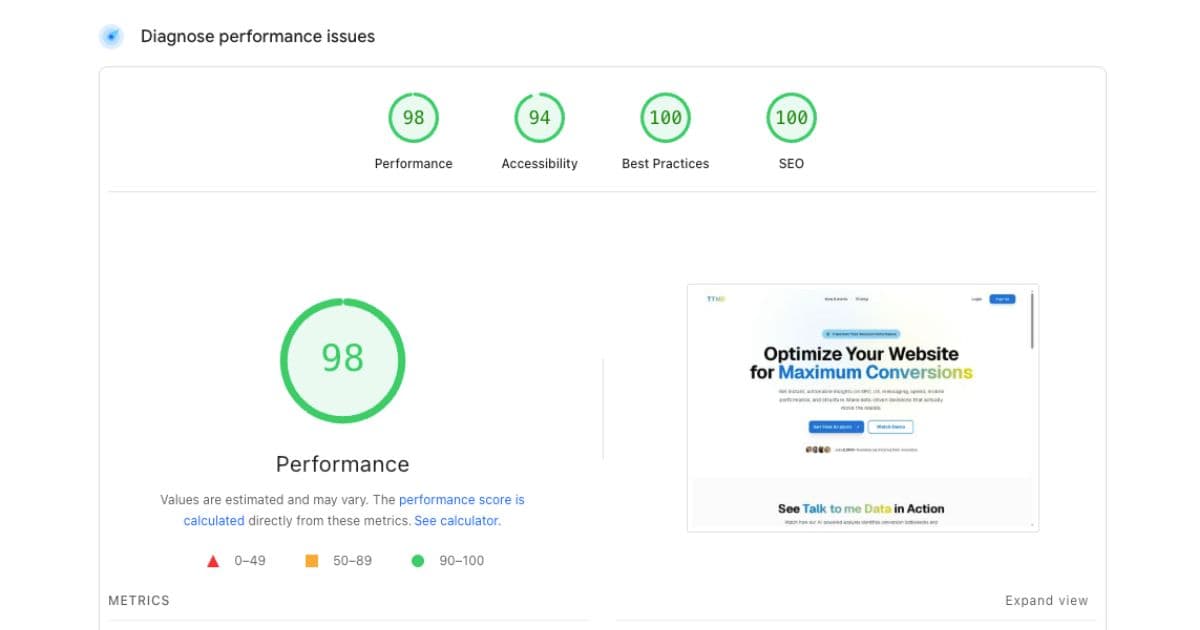
Before making changes, test your site at PageSpeed Insights. Note your score. After implementing optimizations, retest. Target: 90+ score on desktop, 80+ on mobile.
Day 11-14: Mobile Optimization
With 60%+ traffic from mobile devices but conversion rates 50% lower than desktop, mobile optimization offers massive opportunity.
Critical Mobile Fixes (CSS-Only, No Redesign):
- Increase button sizes: All clickable elements should be minimum 44x44 pixels. Add CSS:
min-width: 44px; min-height: 44px; padding: 12px 24px; - Fix font sizes: Body text minimum 16px on mobile (prevents pinch-to-zoom). Add CSS:
@media (max-width: 768px) { body { font-size: 16px; } } - Simplify mobile navigation: Implement hamburger menu if you haven't already. Reduce menu items to 5-7 maximum.
- Make forms mobile-friendly: Use appropriate input types (`type="tel"` for phone, `type="email"` for email). Add `autocomplete` attributes. Stack form fields vertically.
- Ensure CTA visibility: Primary CTA button should be visible without scrolling on mobile devices. Consider sticky CTA bar at bottom.
| Mobile Issue | Impact on Conversions | Fix Time |
|---|---|---|
| Small tap targets (<44px) | -15-25% | 30 minutes |
| Text too small (<16px) | -10-20% | 15 minutes |
| Non-optimized forms | -20-30% | 1-2 hours |
| CTA below fold | -12-18% | 30 minutes |
Week 3: How to Simplify Conversion Paths and Reduce Form Friction
Week 3 focuses on removing obstacles in the conversion journey. Every unnecessary step or form field costs 20-30% of potential converters. Expected improvement: 3-7%.
Day 15-18: Form Optimization
Forms are conversion gatekeepers. Reducing fields from 11 to 4 increased conversions by 120% in Hubspot's case study. Marketo found that removing just one field increased conversions by 26%.
Form Simplification Strategy:
- Eliminate non-essential fields: For each field, ask: "Can we function if we don't have this?" If yes, remove it. You can always collect additional information later via email or in-app surveys.
- Use progressive profiling: Collect basic information first (name, email), then gather additional details over time across multiple interactions.
- Implement autofill: Add `autocomplete` attributes so browsers can auto-populate fields. This reduces completion time by 30%.
- Show progress indicators: Multi-step forms should display clear progress (Step 2 of 3). This increases completion by 20%.
- Inline validation: Show field-level errors immediately (not after form submission). This reduces abandonment by 22%.
- Clear error messages: Replace "Invalid input" with "Please enter a valid email address (example: name@company.com)"
Minimum Viable Form Fields by Type:
- Lead generation: Name, Email (2 fields)
- Demo request: Name, Email, Company (3 fields)
- Free trial signup: Email, Password (2 fields; get name after signup)
- Contact form: Name, Email, Message (3 fields)
Day 19-21: Conversion Path Audit and Simplification
Every page transition is an opportunity for abandonment. Reducing clicks from 5 to 3 typically improves conversions by 15-25%.
Path Simplification Steps:
- Map current conversion path: Document every page/step from landing to conversion completion. Use Google Analytics Behavior Flow or manually click through your site.
- Identify unnecessary pages: Can you combine Information Page + Form Page into a single page? Can you enable guest checkout instead of forcing account creation?
- Remove exit opportunities: On critical conversion pages, minimize navigation options. Remove footer links, sidebar content, and non-essential navigation during checkout/signup.
- Implement smart defaults: Pre-select the most common option (shipping method, account type). This reduces decision fatigue and speeds completion.
For more comprehensive analysis techniques, see our guide:
How to Analyze Your Website for Conversion Issues (Step-by-Step) →Week 4: How to Test, Measure, and Validate Conversion Improvements
Week 4 consolidates gains and validates which changes produced the most impact. This week establishes your optimization baseline for future sprints.
Day 22-25: A/B Testing High-Impact Changes
Not every change improves conversions. A/B testing separates winners from losers, preventing you from keeping changes that actually harm performance.
Priority Test Queue (test in order):
- Headline variations: Test 2-3 headline versions. Run until 95% statistical confidence reached (typically 1-2 weeks depending on traffic).
- CTA button copy: Test different button text variations against baseline.
- Form length: Test simplified form vs original form.
Free A/B Testing Tools:
- Google Optimize: Free, integrates with Google Analytics
- Microsoft Clarity: Free heatmaps and session recordings
- VWO Free Plan: 50,000 visitors/month testing limit
Day 26-28: Analytics Review and Documentation
Compare your Day 28 metrics against Day 1 baseline. Document what worked, what didn't, and why.
Key Metrics to Compare:
- Overall conversion rate: Goal: 15-30% improvement
- Page load time: Goal: Under 3 seconds
- Mobile conversion rate: Goal: Within 30% of desktop rate
- Form completion rate: Goal: 60%+ completion on simplified forms
- Bounce rate on key pages: Goal: Under 60%
Day 29-30: Plan Next Sprint
Use Week 4 insights to plan your next 30-day sprint. Focus on the next highest-impact opportunities identified in your analysis.
Next Sprint Focus Areas (Prioritize Based on Your Results):
- Product page optimization (images, descriptions, reviews)
- Checkout process refinement
- Email capture optimization
- Exit-intent popups and abandoned cart recovery
- Social proof expansion (video testimonials, case studies)
What Results Can You Expect from the 30-Day Sprint?
Based on 100+ implementations across e-commerce, SaaS, and B2B sites, here are realistic improvement ranges:
| Starting Conversion Rate | Conservative Improvement | Aggressive Improvement | New Conversion Rate |
|---|---|---|---|
| 1.0% | +15% | +30% | 1.15% to 1.30% |
| 2.5% | +15% | +30% | 2.88% to 3.25% |
| 5.0% | +15% | +30% | 5.75% to 6.50% |
These improvements compound over time. A 20% conversion rate improvement maintained over 12 months doesn't just mean 20% more conversions; it means 20% more revenue, 20% lower customer acquisition costs, and significantly improved ROI on all marketing spend.
What Mistakes Should You Avoid During Your 30-Day Sprint?
- Changing too many things simultaneously: You won't know which change produced results. Make changes in batches with measurement periods between.
- Skipping baseline measurement: Without Day 1 metrics, you can't prove improvement. Screenshot your Google Analytics dashboard before starting.
- Implementing without testing: Not all "best practices" work for every site. Test changes before making them permanent.
- Perfectionism paralysis: 80% implementation that goes live is better than 100% perfect implementation that never launches.
- Ignoring mobile: If 60% of traffic is mobile but you only optimize desktop, you're only improving 40% of opportunity.
What Tools Do You Need for a 30-Day Sprint?
You can complete this sprint with entirely free tools. Here's the minimum toolkit:
| Purpose | Free Option | Premium Option |
|---|---|---|
| Analytics | Google Analytics 4 | Mixpanel ($89/mo) |
| Speed Testing | PageSpeed Insights | GTmetrix Pro ($14.95/mo) |
| Heatmaps | Microsoft Clarity | Hotjar ($39/mo) |
| A/B Testing | Google Optimize | VWO ($199/mo) |
| Image Compression | TinyPNG, Squoosh | Kraken.io ($9/mo) |
Summary: From Sprint to Sustained Growth
The 30-Day Conversion Sprint proves that significant improvements don't require redesigns, large budgets, or months of work. By systematically addressing high-impact areas: copy and trust (Week 1), speed and mobile (Week 2), forms and paths (Week 3), and testing (Week 4), you can achieve 15-30% conversion rate improvements in a single month.
More importantly, this sprint establishes a repeatable optimization methodology. After your first 30 days, continue with monthly sprints, each targeting the next highest-impact opportunities. This creates compounding improvements: a 20% improvement in Month 1, another 15% in Month 2, and 10% in Month 3 don't add to 45%; they multiply to 51.8% total improvement.
Start your sprint today. Your current conversion rate represents baseline performance; every percentage point improvement is revenue left on the table.
Keep reading
Related guides
Conversion Optimization
Website Checklist: How to Build a Landing Page That Converts
Conversion Optimization
How to Use AI to Improve Conversion Rate: A Practical Guide for Founders

Conversion Optimization